0:00 Intro
0:30 The Honest Answer First
1:24 Why One-Stars Show Up First
2:16 Move One: Flag the Reviews That Break Google’s Rules
3:42 Move Two: Reply to Every One-Star Review
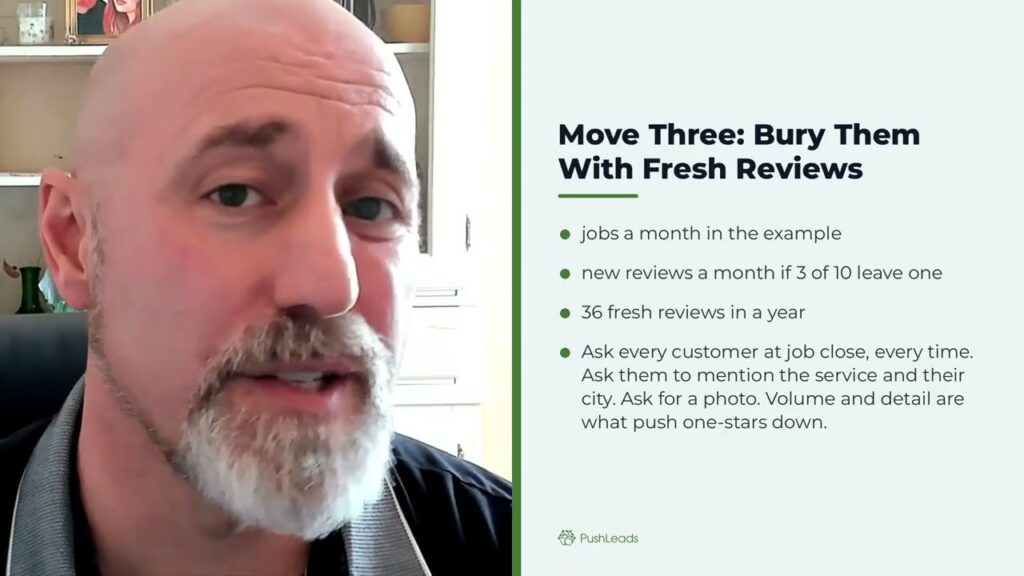
4:46 Move Three: Bury Them With Fresh Detailed Reviews
5:53 Move Four: Control What Shows on Your Own Website
6:33 What Not to Do
7:34 Worked Example: What to Send at Job Close
8:42 Worked Example: How to Reply to a One-Star
9:28 What to Do This Week
Full transcript
0:00 Intro
You can’t delete them and you can’t hide them, but you can take the sting out and bury them. Here’s four moves and order and I’ll walk you through each of them. A restoration company owner emailed me this week and he said his one -star reviews are showing up first at the top of his Google Business Profile and some of them are even recent and he wanted to know how he could make those go away. So this video is my answer to him and if you are a contractor with the same problem, it’s my answer to you as well.
0:30 The Honest Answer First
The honest answer first, Google will not let you delete a legitimate review. There’s no setting that changes the display order and nobody can flip a switch and hide the bad reviews. I know that’s not what you want to hear, but that’s the truth and anyone selling you a remove bad review service is either lying or doing something that will get your profile suspended and that’s never good. What you can do is make the one star reviews matter less. You can flag the ones that actually break Google’s reviews. You can reply to the rest calmly and professionally and you can bury them under a steady flow of fresh detail reviews and on your own website, you control what people see. That’s it. Before moves and let’s go why one star reviews show up first? Google’s default sort on a Google Business Profile is called most relevant.
1:24 Why One-Stars Show Up First
Google does not publish exactly how it picks most relevant, but in my experience a few things drive it. Regency matters. A review from last month out ranks one from three years ago. Detail matters. A review that describes the service, the city, and its specific outcome ranks higher than a review that says great job. Photos help as well. In my experience, reviews with photos tend to show up higher. And here’s the painful part. A one star review that specific and recent will outrank a five star review that just says, hey, I love these guys. You’re unhappy customers often write more than your happy ones. That’s what you’re fighting. So your moves have to attack each of those factors directly. Move one, flag the reviews that break Google’s rules.
2:16 Move One: Flag the Reviews That Break Google’s Rules
Before you do anything else, go through each one star review and read it carefully. Google has a list of content policies and reviews that violate these policies can be removed by Google. And here’s key ones to look for. A person who is never your customer. You have no record of them and the job description doesn’t match anything you’ve done or you recognize it as a competitor or former employee with a grudge. That’s a conflict of interest violation. The review itself is abusive, uses slurs, or completely off topic. The review is a duplicate posted by the same person more than once. The review contains someone’s personal information or the review is clearly spam or a fake. If a review fits any of those, go to your Google Business Profile, find that review and use the flag button to report it. Write a short specific explanation as to why it violates policy. Don’t just say this is fake. Say we have no record of this person as a customer and the incident described does not match any job in our system. So the thing is Google does not remove reviews quickly. It can take weeks and sometimes many flag reviews never come down at all. Real complaints, even unfair ones, almost never get removed. So flag the legitimate violations but don’t count on removal. Move on to the next step immediately.
3:42 Move Two: Reply to Every One-Star Review
Move 2. Reply to every one star review. This is the move that most contractors skip and it’s the one that matters most to the next person reading that review. When someone is deciding whether to call you, they read the bad reviews first, then they read your response. Your response is not for the reviewer, it’s for that next customer. Here are the rules for a good response. Keep it short. Three to five sentences maximum, acknowledge the experience without admitting liability, take it offline, give a name and a phone number or email, and never argue the facts publicly. Never post job details or insurance information. Own the outcome even if you disagree with what happened. Keep it short, calm and professional. That’s what the next customer wants to see. A measured response from a business owner tells them, this company handles problems like a professional. An argument in the reply tells them the opposite. Move three, bury them with fresh detail reviews.
4:46 Move Three: Bury Them With Fresh Detailed Reviews
Now this is the long game and it’s the most powerful move that you have. If your one stars are old, you can bury them with new reviews that are more recent, more detailed and have photos. Google’s most relevant sort will push these to the top. The only way to get a steady flow of abuse is to ask them every single time. Not just jobs where you think the customer is happy, ask for reviews on every job, at the close of every job, and I’ll show you exactly what to send in a minute. When you ask, tell the customer two things. First, ask them to describe the service and their city. Not because it sounds nice, but because that specifically is what Google rewards. Second, if they have photos, ask them to attach one. Even a phone photo of a finished work makes that review more useful to the next customer. Do this consistently and within a few months, the top reviews on your profile will be recent, detailed and positive. Build one star, it’s dropped further and further down. Move four. Control what shows on your own website.
5:53 Move Four: Control What Shows on Your Own Website
Google controls what people see on your Google Business Profile, but you control what people see on your website. Use that. Pull your best real reviews word by word and feature them on your homepage, your services pages, and your contact page. If a customer reads a glowing review before they even hit your Google profile, they’re coming in with a different frame of mind. You can also embed your overall star rating and review count through the tools that pull from Google directly, so the number is always current without you updating anything manually. And your website is the one place that nobody can post and wants our review, so make your website work for you. What not to do?
6:33 What Not to Do
Now, here’s a few things that will make things worse, not better. Do not buy reviews. Do not offer a discount, a gift card, cash, or anything else in exchange for review. Google prohibits both of those and can suspend your entire profile. The FTC also bans fake or incentivize reviews. If your profile gets suspended, you lose the calls coming in from it immediately, and that’s never worth it. Do not review gate. Review gating means that you only send the review request to customers you think are happy and you’re screening out the ones that might leave a bad review. Google explicitly prohibits this. You have to ask everyone for a Google review every time. If someone is unhappy, you want to know before they write a review anyway. Do not ask friends, family, or employees to leave reviews. Google’s rules count that as a conflict of interest, and those reviews can get removed. A worked example, what to send at the job close.
7:34 Worked Example: What to Send at Job Close
So here’s how the math works for a shop closing 10 jobs a month. If you send this message to every one of them and three of them leave a review, that’s three new reviews every month. In a year, that’s 36 fresh, detailed reviews, sacking up on your Google business profile. And here’s the message you should use. Picture this going out as a text because text usually get better response for Google reviews, and you want to send this out the same day as the job close. Hey, it’s your name from your company. Thanks for letting us take care of this for you. If you have two minutes, a Google review would mean a lot to us. When you write it, mentioning the type of work we did in the city helps others in city find us. Here’s the direct link with your review link. Thanks again. That’s it. No pressure, no script about how much it means, short and direct with a link in the message they don’t have to hunt. If you have a job management tool, this goes out automatically. If you don’t, your tech or team member needs to send this at the close of a job, a work example,
8:42 Worked Example: How to Reply to a One-Star
how to reply to a one star. Here’s our response looks for a one star that says something like they showed up late. They did the job too fast and left a mess behind. Your reply could be something like this. Thank you for taking the time to leave this. What you’ve described is not the experience that we aim to deliver. And I’m sorry, it fell short. I like to look into this personally. Please reach out to me at my name or phone number and email so we can make this right. That’s it. You’re not saying it happened exactly as described. You’re not posting photos on the job site. You’re not explaining your insurance process. You’re telling the next person reading that review that this owner reads these cares and responds like a professional. That’s the whole goal. What to do this week?
9:28 What to Do This Week
Here’s what I would do if I were in that disaster restoration owners shoes right now. This week go through every one sub review flag the ones that generally violate Google’s policy. Write a calm professional reply to every one star review that doesn’t get flagged. Get your direct review link from your Google Business Profile and build that job close text into your process starting today. If you want any help with the reply drafting or setting up the automatic requests, that’s something that we do for contractors. We set up the automatic review request so it fires after every completed job and we draft the one star replies for you and you can get a free visibility teardown at SEO .PushLeads .com backslash audit or call us at 828 -348 -7686. The one star is going to be there. You can either let them sit at the top unanswered or you can respond like a professional and bury them with volume. That’s the whole game. I’m Jeremy Ashburn with PushLeads and I help small businesses get more leads without struggle and frustration. Talk soon.
Key Takeaways
Want it done for you? See our local SEO services.
You cannot delete a legitimate Google review or change the display order manually. What you can do is flag policy violations, reply professionally to every one-star, and bury bad reviews by consistently collecting fresh, detailed, photo-backed reviews from real customers. On your own website, you control the narrative entirely. Work all four moves together and the one-stars drop lower over time.
- Google sorts reviews by recency, detail, and photos, not just star rating, so a specific recent one-star can outrank a vague five-star.
- Flag only reviews that genuinely violate Google policy, such as fake accounts, conflicts of interest, or spam, and write a specific reason when you report.
- Reply to every one-star review in three to five sentences. The response is for the next customer reading it, not for the person who wrote it.
- Ask every customer for a review at the close of every job, and prompt them to mention the type of work and their city.
- Feature your best real reviews on your website. It is the one place where nobody can post a one-star without your control.
- Never buy reviews, offer incentives, or review gate. All three violate Google policy and can get your profile suspended.
- Three reviews per month adds up to 36 fresh, detailed reviews in a year, which steadily pushes one-stars further down the page.

How to Push Down 1-Star Google Reviews Without Breaking the Rules

The most direct answer to how to push down 1-star Google reviews is this: you cannot delete them, but you can make them matter less by flagging policy violations, replying calmly to the rest, and flooding your profile with newer, more detailed, photo-backed reviews from real customers. That combination shifts what shows at the top. I work with contractors across the country on exactly this problem, and the four-move framework I walk through below is the same one I use with clients. A restoration company owner reached out to me because his one-star reviews were showing up first on his Google Business Profile, some of them recent, and he wanted to know how to make them disappear. The honest answer I gave him is the same one I will give you here. Google does not publish a remove bad review button. There is no setting that changes the display order. Anyone selling you a service that promises to delete legitimate reviews is either lying or doing something that risks getting your entire profile suspended. What you do have is real leverage, and it comes from understanding exactly why certain reviews rank where they do and then attacking those factors directly.
Want more customers from Google & AI search?
Get a free SEO audit of your site — see exactly what to fix first.
Why One-Star Reviews Surface at the Top of Your Profile

Google ranks reviews on a Business Profile under a sort called “most relevant,” and that sort rewards three specific qualities: recency, detail, and the presence of photos. A review posted last month outranks one posted three years ago. A review that names the type of service, the city, and a specific outcome outranks one that simply says “great job.” A review with an attached photo outranks one with no image at all. The painful reality is that unhappy customers tend to write more than happy ones. A dissatisfied customer has motivation to describe exactly what went wrong, which means their one-star is often longer and more specific than the five-star someone left after a smooth job. That detail is precisely what Google’s algorithm rewards, so the one-star climbs and the vague five-star sinks.
In this video
- 0:00 Why Greenville Businesses Lose to Competitors
- 1:34 Four-Layer Local SEO System Overview
- 2:02 Google Business Profile Optimization
- 2:46 Google Reviews Strategy and Responses
- 3:29 Citations NAP Consistency and Directories
- 4:15 Technical SEO Mobile Speed and Schema
- 5:02 Time Investment and When to Hire Out
- 5:36 Tracking GSC GBP and Analytics Monthly
Full transcript: How to Improve Your Google Rankings in Greenville SC (2025)
Does Google show the most recent reviews first or the most relevant ones?
Google defaults to “most relevant,” not strictly chronological, but recency is one of the heaviest factors inside that relevance calculation. A very recent one-star with specific detail about the service and location will almost always outrank an older positive review with no detail. You can manually switch the sort to “newest” as a viewer, but most people never do, so the most relevant sort is what your potential customers see by default.
Why do detailed negative reviews rank higher than short positive ones?
Google’s relevance model appears to reward reviews that contain searchable, specific language, things like service type, neighborhood, outcome, and job details. An unhappy customer who writes three paragraphs about what went wrong is giving Google a lot of signal. A happy customer who writes “10 out of 10 would recommend” gives Google almost none. The result is that specificity, not sentiment, drives rank, which is why training your happy customers to write detailed reviews is the most powerful long-term fix available to you.
Can photos on a Google review actually affect where it shows up?
In my experience working with contractor profiles, reviews that include at least one photo do tend to surface higher in the most relevant sort. The photo adds richness to the review in a way that Google values, and it also makes the review more useful to the person reading it. This is why, when I coach contractors on asking for reviews, I always tell them to ask customers to attach a photo of the finished work if they have one. Even a quick phone shot makes that review more likely to outrank a one-star with no image.
Move One: Flag the Reviews That Actually Violate Google Policy

Before you do anything else, go through every one-star review on your profile and read each one carefully against Google’s review content policies. Flagging a review does not guarantee removal, but it is the right first step when a review genuinely breaks the rules. The categories that Google will actually act on include reviews from people who were never your customer, reviews that are abusive or use slurs, duplicate reviews posted by the same person more than once, reviews containing someone’s personal information, and reviews that are clearly spam or fabricated. Conflicts of interest, such as a competitor or former employee posting under a fake name, also qualify.
How do I report a fake Google review for my business?
Go to your Google Business Profile, locate the review in question, click the three-dot menu next to it, and select “Report review.” Write a short, specific explanation of why it violates policy. Do not just write “this is fake.” Instead write something like: “We have no record of this person as a customer, and the incident described does not match any job in our system.” A specific explanation gives Google’s review team something concrete to evaluate, which improves the odds of removal.
How long does it take Google to remove a flagged review?
It can take several weeks, and many flagged reviews are never removed at all. Google’s review team has to determine on their end whether the review violates policy, and they err heavily on the side of leaving reviews up. Real complaints, even ones you believe are unfair or exaggerated, almost never qualify for removal. Flag the genuine policy violations, document what you submitted, and then move immediately to the next step without waiting on Google to act. Counting on removal as your only strategy will leave you stuck.
What Google review violations actually get reviews taken down?
The violations most likely to result in actual removal are spam and fake accounts, off-topic content that has nothing to do with a customer experience, reviews that contain personal or confidential information about another person, and content that is clearly posted by someone with a conflict of interest such as a competitor or current employee. Venting, exaggeration, and unfair characterizations, even if inaccurate, do not typically meet the removal threshold. Google gives reviewers significant latitude to share negative opinions.

Move Two: Reply to Every One-Star Review

Replying to every one-star review is the move that most contractors skip, and it is the one that matters most to the next person who reads that review. When someone is deciding whether to call you, they read the bad reviews first and then they read your response. Your reply is not for the person who wrote the one-star. It is for the potential customer who is reading the exchange to judge how you handle problems. A measured, professional reply signals that you take your work seriously and address issues when they come up. An argument in the reply section signals the opposite.
What should I say when replying to a one-star Google review?
Keep it to three to five sentences. Acknowledge the experience without admitting liability. Invite the person to contact you directly by name, phone number, or email. Never argue the facts publicly, never post job details, and never reference insurance or legal processes in the reply. Here is a word-for-word example you can adapt: “Thank you for taking the time to leave this. What you have described is not the experience we aim to deliver, and I am sorry it fell short. Please reach out to me directly at [name] and [phone or email] so I can look into this personally.” That is the entire reply. For more context on how to frame these responses as a contractor, the guidance on how to respond to bad reviews covers the nuances in detail.
Should I explain what really happened in my reply to a bad review?
No. Explaining your side publicly almost always backfires. The potential customer reading the exchange does not know you, so a detailed defense reads as defensive rather than accountable. You are also at risk of revealing job-specific details that could become a liability. The goal of the reply is not to win the argument. It is to show the next reader that you are the kind of business owner who responds calmly and takes responsibility. That impression is worth far more than being factually correct in a public thread.
Does responding to Google reviews actually help my local ranking?
Responding to reviews is a confirmed engagement signal in Google’s local ranking system. Google has stated publicly that responding to reviews is good practice and can influence how your Business Profile performs. Beyond ranking, the practical benefit is that an unanswered one-star looks much worse than an answered one. Potential customers notice when a business owner never responds to criticism. Consistent, professional replies build trust with the readers who matter most, the ones who have not called you yet.

Move Three: Bury One-Stars With Fresh, Detailed Reviews

This is the long game, and it is the most powerful move available to you. If your one-stars are ranking high because they are recent and detailed, the fix is to generate a steady stream of reviews that are even more recent and even more detailed. Google’s most relevant sort will push those to the top and the one-stars will drop. The only way to get that steady flow is to ask every customer, every single time, at the close of every job, without exception. Not just the jobs where you think the customer is happy. Every job.
What should I ask customers to include in their Google review?
Ask them to mention two things: the type of work you did and the city or neighborhood where you did it. This is not just about sounding thorough. Those two details are exactly what Google rewards in the most relevant sort, and they help your review show up when someone in that area searches for that type of service. If the customer has a photo of the finished work, ask them to attach it. Even a single phone photo significantly increases the weight that review carries in Google’s relevance calculation.
How many reviews do I need to push down a one-star?
There is no fixed number, but volume and recency working together are what drive one-stars lower. If you close ten jobs a month and three customers leave a review each month, that is 36 new reviews in a year, all of them recent, all of them detailed if you asked correctly. That volume will bury most one-stars. Understanding the ideal Google review score and count for your category can help you set a realistic target so you know when you have enough volume to make a real difference.

How do I ask for a Google review without being awkward about it?
Send a text the same day the job closes. Text gets a higher response rate than email for review requests. Keep it short, include a direct link so the customer does not have to hunt for your profile, and prompt them with the specific detail you want. Here is the exact text message I recommend: “Hey, it’s [your name] from [your company]. Thanks for letting us take care of this for you. If you have two minutes, a Google review would mean a lot to us. When you write it, mentioning the type of work we did and the city helps others in [city] find us. Here’s the direct link: [link]. Thanks again.” Nothing more. No pressure, no long script. If you use a job management tool, set this to fire automatically at job close so it never falls through the cracks.
Move Four: Control the Review Experience on Your Own Website

Google controls what potential customers see on your Business Profile, but you control your website completely. Use that advantage deliberately. Pull your best real reviews, word for word, and feature them on your homepage, your service pages, and your contact page. A customer who reads a detailed, positive review before they ever visit your Google profile is coming in with a completely different frame of mind than one who hits the one-stars first. Your website is the one place where no one can post a negative review without going through you, so make it work hard for you.
How do I display Google reviews on my website without manually updating them?
Several tools pull directly from your Google Business Profile via the Google Places API and display your current star rating and review count automatically. When a new review comes in, the widget updates on its own. This means your site always shows current numbers without you touching anything. You can pair this with a manually curated section that features your three to five best detailed reviews in full, giving visitors both a live count and a human, specific story to read before they decide to call.
Should I embed a Google review widget or copy reviews manually to my site?
Both have a place. An embedded widget that pulls live from Google shows an accurate, current count and star rating, which builds credibility because visitors know it is not cherry-picked. Manually copied reviews, featured in a designed section of your site, let you highlight the most detailed and compelling testimonials that might otherwise get buried in a feed. Using both together gives you a live trust signal and a curated story at the same time. Make sure any manually copied reviews are attributed clearly so there is no question about their source.
Can my website reviews help with AI search results as well as Google?
Yes. AI-powered search engines and answer engines pull from multiple sources when they build responses about local businesses, and your website content is one of those sources. Reviews and testimonials embedded in your site pages give these systems more positive signal about your business than your Google profile alone provides. If you want to understand how review volume and rating affect your visibility in AI-generated answers, the breakdown on reviews for AI search visibility explains the specific thresholds that matter.
What Not to Do When You Have One-Star Reviews

There are several moves that contractors attempt when they are frustrated with bad reviews, and all of them create bigger problems than the one-stars themselves. Knowing what to avoid is as important as knowing the four moves that actually work.
Can I get in trouble for buying Google reviews for my business?
Yes. Google’s policies explicitly prohibit fake reviews, and the FTC prohibits paid endorsements that are not disclosed. If Google detects a pattern of purchased reviews, which it actively looks for, it can remove those reviews and suspend your entire Business Profile. A suspended profile means you lose all calls and leads coming through it immediately. The risk-to-reward ratio on buying reviews is terrible. The same energy spent on asking real customers consistently will produce durable results with zero risk of penalty.
What is review gating and why does Google prohibit it?
Review gating means filtering your customers before sending a review request, only reaching out to ones you believe are happy and screening out the ones who might leave a bad review. Google prohibits this explicitly because it creates a biased sample of reviews on your profile. Beyond the policy issue, review gating is a missed signal. If a customer is unhappy enough to leave a one-star, you want to know that before they write it, so you have a chance to resolve it. Asking everyone removes the filter and gives you a chance to catch problems early.
Can my employees or family members leave reviews to help my rating?
No. Google’s policy counts reviews from employees, owners, and family members as conflicts of interest. These reviews can be removed when Google detects the connection, and patterns of this behavior can trigger broader action against your profile. Beyond the policy risk, real customers can often sense when reviews sound like they were written by insiders, and that erodes trust rather than building it. Authentic reviews from actual customers, collected consistently, are the only approach that holds up over time.
How to Fully Optimize Your Business Profile So Good Reviews Have Maximum Impact

Collecting great reviews is only part of the picture. The profile those reviews live on needs to be fully built out so Google treats it as a credible, active listing. A sparse or incomplete Business Profile limits how much any review, positive or negative, actually influences your rank and visibility. Everything on your profile, from your business category to your service area to your photos, works together with your reviews to determine where you show up.
What parts of my Google Business Profile affect how reviews are displayed?
Your primary business category, the completeness of your services list, the regularity of your posts, and the number and quality of your profile photos all interact with your review signals. A profile that is fully completed and regularly updated tells Google the business is active and engaged. That activity score influences the most relevant sort for reviews, meaning a fully optimized profile gets more out of the same reviews than a bare-bones listing does. If you want to see what full optimization looks like for a service contractor, the page on how to optimize Google Business Profile walks through the key elements in detail.
How often should I post to my Google Business Profile to stay active?
Posting at least once a week keeps your profile signaling activity to Google. Posts can be project updates, before-and-after photos, seasonal service reminders, or answers to common customer questions. The content matters less than the consistency. Regular posting tells Google the business is current, and it gives potential customers who land on your profile something fresh to read beyond your reviews. A profile that has not been posted to in six months looks stagnant regardless of how good the reviews are.
Should I respond to positive reviews too or just the negative ones?
Responding to positive reviews as well as negative ones shows consistent engagement and signals to Google that you actively manage your profile. For positive reviews, the reply can be brief. Thank the customer by name if they included it, reference the specific service they mentioned, and invite them back. This also reinforces to anyone reading the exchange that you pay attention to what customers say. Selective response patterns, where you only reply to bad reviews, can look reactive rather than professionally engaged.

Frequently Asked Questions
Can Google ever remove a one-star review automatically?
Google does have automated systems that filter reviews suspected of spam or policy violations, and sometimes reviews disappear without anyone flagging them. This happens when Google’s systems detect patterns that suggest fake or coordinated activity. However, you cannot trigger automatic removal by any action on your end. Flagging a review sends it to a human review team, not an automatic filter. For legitimate reviews from real customers, automatic removal is not something you can count on or predict.
How long does it take to push down a one-star review by collecting new ones?
It depends on your starting volume. If you currently have ten reviews and two of them are one-stars, you need significantly more new reviews to dilute their impact than a business with fifty reviews does. At a consistent pace of three to five new reviews per month, most contractors see meaningful movement in their profile’s review mix within three to six months. The one-stars do not disappear, but they move lower in the most relevant sort as newer, more detailed reviews accumulate above them.
Does my overall star rating affect my Google Maps ranking?
Star rating is one factor in Google’s local ranking algorithm, but it is not the most important one. Proximity, relevance, and prominence all carry significant weight. A business with a 4.6 average and 80 reviews will typically outrank a competitor with a 5.0 average and 4 reviews in most local searches. Volume, recency, and profile completeness tend to matter more than a perfect rating. Chasing a 5.0 by collecting only the safest reviews is less effective than building steady volume from every customer.
What if the same person leaves multiple one-star reviews on my profile?
Duplicate reviews from the same account are a clear policy violation you can flag. When you report it, specify in your explanation that the same reviewer has posted more than once about the same experience. Google’s policy explicitly prohibits duplicate content, and duplicate reviews from the same account are among the more reliably removed violations. Keep a record of the account name and the dates of both reviews when you submit your flag report so the reviewer team has the specifics they need.
Is it worth hiring someone to manage my Google reviews?
For a contractor running a full schedule, the systems that generate and respond to reviews consistently take real time to maintain. Automated review request triggers, reply drafting for one-stars, and ongoing profile monitoring are all tasks that can be handed off. The question is whether the cost of that help is offset by the calls and jobs that a healthier review profile generates. For most contractors I work with, the answer is yes, particularly because the alternative is doing nothing and letting the one-stars sit unanswered at the top. If this is an area where you need outside help, you might consider whether to hire local SEO agency to handle it for you.
Can a competitor leave me a one-star review?
Yes, and it happens. A review from a competitor or former employee with a grudge qualifies as a conflict of interest under Google’s policy, which makes it flaggable. The challenge is that you have to be able to demonstrate the conflict, which is not always straightforward. If the reviewer’s account has reviewed only your competitors favorably or has no other review history, that pattern is worth noting in your flag report. Google does not always act on these, but a specific, documented report gives you the best available chance.
Should I ask for reviews right after the job or wait a few days?
Send the review request the same day the job closes. Response rates drop significantly as time passes. The customer’s experience is freshest immediately after the job, their satisfaction is at its peak, and the message feels timely rather than like an afterthought. A same-day text with a direct link requires no effort on the customer’s part to remember who you are or what you did. Waiting even a week means you are competing with everything else in that customer’s life for their attention, and most of the time, you will lose.
What is the fastest way to improve my Google rating if I have several one-stars?
The fastest thing you can do today is reply to every unanswered one-star review. That does not change your rating but it immediately changes how the reviews read to potential customers. The second fastest move is to get your review request text set up and send it to every job you close starting this week. Even two or three new detailed reviews in the next thirty days begin shifting the most relevant sort. Flag any genuine policy violations in parallel. All three moves together produce faster visible change than any single one alone.
Start Working These Four Moves This Week
If I were in that restoration contractor’s position right now, here is exactly what I would do before the week is out. First, I would go through every one-star review and flag the ones that genuinely violate Google’s policy, using a specific explanation for each one, not just “this is fake.” Second, I would write a calm, professional reply to every one-star that did not get flagged, three to five sentences, an acknowledgment, and an invitation to reach out directly. Third, I would pull my direct Google review link from my Business Profile and build the job-close text message into my process today, so it goes out automatically or manually at the end of every job from here forward.
Those three actions cost you nothing except time, and they address all the factors that Google weighs: engagement signals from your replies, recency and detail from new reviews, and profile activity from consistent use. The one-star reviews are going to be there regardless. The only real choice is whether they sit at the top unanswered, or whether they get pushed down by a steady stream of professional responses and better, newer reviews stacking up above them.
If you want help setting up automatic review requests that fire after every completed job, or if you want someone to draft the one-star replies for you so you are not staring at a blank screen, that is work we do at PushLeads for contractors every day. Reach out to us at https://pushleads.com/contact/ and we can take a look at your profile together and figure out what the right next move is for your specific situation.
Keep Reading
Want more customers from Google & AI search?
Get a free SEO audit of your site — see exactly what to fix first.
Your path · The Ultimate Google Business Profile Guide
Keep going: read these next

- Up nextHow to Handle and Remove Fake Reviews on Google Business Profile
- Ethical Review Generation Strategies: How to Get More 5-Star Local Reviews
- Asheville SEO Review Management: Turn Google Reviews into Local Business Growth
- The Ultimate Google Business Profile Guide: Dominate Local Search



Want this done for you?
Scan your site. See the gaps. Decide with numbers.
- Rankings, Google Business Profile and site-speed teardown
- Report lands in your inbox in about a minute
- No obligation · 4.9 from 67 Google reviews
 Continue reading