


Key Takeaways
A large share of your SEO workflow can be automated safely, but automation executes strategy rather than defining it. Every piece of content needs a human approval gate before it touches a live site. The tasks that go wrong when fully automated, fact-checking, approval, contact information, and strategic intent, cost far more to fix than the human review hours required to prevent the problem in the first place.
- Automation is the engine, not the driver. Write your strategy first, then let tools execute inside it.
- AI-generated content can repeat the same angle across multiple pages, triggering duplicate content problems. Build a content map before automating anything.
- AI language models confidently produce outdated or invented facts. Every published piece needs a human fact-check pass.
- An approval gate before publication catches wrong service areas, wrong contact details, and off-brand content before it goes live.
- Rank tracking should be automated for data collection, but a human needs to interpret that data weekly.
- The quality of an automated local page depends entirely on the quality of the brief, not on the tool.
- More automation does not automatically mean lower cost. A bad page that suppresses other pages on your site is expensive to recover from.
Key moments (10)
0:48 The Biggest Myth: Automation Replaces Strategy
1:38 Myth: Automated Content Is Always Unique
2:32 Myth: Fact-Checking Happens Automatically
3:27 Myth: You Can Skip the Approval Step
4:29 Myth: Rank Tracking Is Either All Manual or All Automated
6:26 Myth: Automated Local Content Outperforms Manual Every Time
7:26 Myth: Automating Everything Saves the Most Money
8:22 Myth: You Only Need to Review Content Once
9:09 What to Do Right Now
Full transcript
0:00 Intro
Automated SEO versus made -new SEO, what to automate, what to supervise, and what to never touch. You probably heard that AI could fully automate your SEO, and that’s wrong, and it’s going to cost businesses real rankings when they believe it. Here’s the actual answer. A big share of your SEO workflow can be safely automated, but another chunk needs a human supervising it, and there should be specific tasks that you should never hand to automation alone. So I run push -rank, which is our autonomous SEO publishing platform. We manage content on more than 30 WordPress sites, and I’ve seen exactly what breaks and when the wrong things get automated. And this video is the God I wish I had before I built the system. The biggest man, automation replaces strategy.
Want it done for you? See our local SEO services.
0:48 The Biggest Myth: Automation Replaces Strategy
The number one thing I hear from business owners is this. I set up an AI console and my SEO is handled. People believe this because a tool to generally impressive now. You can generate a 500 word article in 30 seconds, so it feels like the job is done. But here’s what’s actually happening. The tool is producing words on a strategy. Strategy means knowing which page is your site is missing, which keywords connect to real body intent in your market, and how your intent fits together as a whole. No automation tool makes those calls directly on its own. What to do instead, write your content strategy yourself or with the consultant, then let automation execute inside that strategy. Automation is the engine, not the driver. Myth, automated content is always unique. Because business owners assume that because AI generates fresh text, the
1:38 Myth: Automated Content Is Always Unique
output must be unique across their site. And this is one of the most dangerous myths I see in practice. Saying exactly the same thing about the same topic in the same city, in Google treats duplicate content as a quality signal failure. It could suppress both pages and search results. At PushRank, one of our first guardrails we built was a similarity check before any page goes live. So every new draft gets compared to its existing published pages. If the overlap crosses a threshold, the page does not publish. It’s going to do a review queue for a human editor. What to do instead, build a content map before automating anything. Every URL gets a unique topic, a unique angle, and a unique intent. Automation builds those slots, but does not define them. Myth, back checking happens automatically.
2:32 Myth: Fact-Checking Happens Automatically
This one has real consequences. AI language models are trained on data with a cutoff date. They confidently state things that are outdated, wrong, or even invented. In SEO content, that means that wrong to do to happen, wrong product specs, wrong regulatory details, or made up citations. And I personally caught generate drafts, citing studies that do not exist, or quoting prices that are years out of date. The myth is that AI knows your industry. It doesn’t. It pattern matches on training data. What to do instead, every post piece needs a human fact check pass. Like any specific claim or external reference in the draft, verify one before it goes live. At our scale, that a non -negotiable step in the workflow and skipping it is how you publish content that embarrasses your brand. Myth, you can skip the approval step.
3:27 Myth: You Can Skip the Approval Step
If AI wrote it, it’s probably fine to publish automatically. This is the belief that creates the worst failures. Automated publishing without an approval gate is how clients wake up to a live page about the wrong service in the wrong city with the wrong contact information. We run more than 30 WordPress websites through push -right. Every single piece of content has an approval check. The automation drafts, formats, and queues the page and a human approves it before it touches the live site. And that one step has caught wrong service areas, off -brand town, keyword stuffing from a bad prom, and once a page that was published to the wrong client’s site, because the configuration error that we caught before it went live. What to do instead? Build an approval gate into your automation workflow. It does not need take -long, in my experience a 10 -minute review catches most of the series errors. Never set your content automation to publish without a manual review. Myth, rank tracking is either all manual or all automated.
4:29 Myth: Rank Tracking Is Either All Manual or All Automated
Some owners track rankings by hand in a spreadsheet. Others set up a full automation and never look at the data. And both extremes are wrong. Manual tracking is too slow at any real scale. If you’re managing keywords across multiple locations or services, a human check in positions at one time misses trends and responds weeks late to ranking drop. Full automation would know human review, misses context. The tool will show you ranking, how well ranking is doing, but will not show you how a competitor just wants a new page or that Google wrote out a core update or that is penalizing itself. What to do instead? Automate the data collection completely. Use a rank tracking tool that pulls position daily or weekly across all your target keywords and locations. Then schedule a human review of that data once a week. The automation gives you the numbers, the human decides what they mean and what to do next. Myth, automated keyword research is good enough. Keyword research tools are powerful. They pull search volume competition scores and related terms fast. So owners assume the tool is doing the research. The tool is just servicing data. Research is the interpretation. For example, the search, handcrafted SEO versus automated SEO, shows an average position of 21 in our data. An automation tool sees that term and might tag it as a target. A human looked at it and says, does this return reflective buyer or someone tried still trying to figure out what they want? These are different pages with different goals. Automation cannot make that call correctly each time. What to do instead? Use tools to gather data and then have a human segment the list by intent before briefing content. Buy your 10 keywords, research your 10 keywords and comparison keywords need a different page structure and different calls to action. Myth, automated local content outperforms manual every time.
6:26 Myth: Automated Local Content Outperforms Manual Every Time
This is a real question in the data we see. Does automated local content outperform manual optimization? The answer is it depends entirely on the quality of the brief. Automated local content that is built on a solid location -specific brief with real service details, real service area information, and real intent can perform as well or even better than a manually written page because it can be produced faster at a greater scale. Automated local content built on a generic prompt produces generic pages that do not ring for anything. What to do instead? Treat your brief as a product, not the article. Before automation touches a local page, define the city, the specific service, the target customer, the depreciator, and the call to action. Give the automation a fully loaded brief and it produces youthful content. Give it nothing and it produces nothing worth publishing. Myth, automated everything saves the most money. The assumption here is straightforward.
7:26 Myth: Automating Everything Saves the Most Money
More automation equals lower cost equals higher margin. In SEO, this is not how it works. The cost of a bad page is not zero. A page with a duplicate problem, a factual error, or a wrong service area type can suppress other pages on your site. It can damage your site’s overall quality score with Google. Please, the wrong phone number. The recovery cost of a site -wide quality problem is almost always higher than the cost of the human review hours. It would have taken to prevent it. What to do instead? Automate the high -volume, low -judgment tasks. Rank tracking, content drafting, internal link suggestions, metadata generation. Keep humans in the low -volume, high -judgment tasks, strategy, back -checking, approval, and anything touching, contact information. That split is where the real ROI lives. Myth, you’ll only need to review content once.
8:22 Myth: You Only Need to Review Content Once
Owners review a page when it publishes and consider it done, but SEO content is not static. Search results change competitors update their pages and Google’s understanding of topics evolves. A page that ranked at position four in January may need a content refresh in July to hold that position. Automated tools cannot tell you when to pay these a refresh. They can tell you when the ranking dropped, but they cannot tell you why or what to change. What to do instead? Set a recurring review calendar in your top -performing pages. In my experience, quarterly reviews on your highest traffic pages catch decay early enough to fix it without a full rewrite. Automation flags are raking data, but humans do the refresh work. What to do right now? Here’s the split in plain terms.
9:09 What to Do Right Now
Automate bees, rank tracking, content drafting inside approved briefs, metadata generation, internal link suggestions, and review request sequences. Supervise these content -before -publication, keyword -intense segmentation, local page briefs, raking data interpretation. Never automate these without a human sign -off. Publication to live sites, content information on pages, factual claims, and statistics, anything touching client accounts. If you’re not sure where your current SEO workflow stands, you can get your free AI visibility check at PushLeads .com slash check. And we’ll look at your site and tell you exactly what is saved to automate, what needs supervision, and what to fix first. You can also call us directly at 828 -348 -7686. Start there, then build the system the right way. I’m Jeremy Ashburn with PushLeads. I help small businesses get more leads without struggle or frustration. Talk to you soon.
Automated vs Manual SEO: Where the Real Line Is

Most of your SEO workflow can be safely automated, but specific tasks require human judgment before anything goes live, and confusing the two categories is what causes real ranking damage. I run PushRank, our autonomous SEO publishing platform, and we manage content across more than 30 WordPress sites. After watching exactly what breaks and when, the clearest answer I can give you is this: automate data collection and content drafting, supervise keyword intent and local page briefs, and never let automation publish to a live site without a human sign-off.
The reason this question matters is that the tools have gotten genuinely impressive. You can generate a 500-word article in 30 seconds, so it feels like the job is finished. It is not. Producing words is not the same as executing a strategy, and publishing without review is how businesses end up with live pages promoting the wrong service in the wrong city with the wrong phone number.
In this video
- 0:00 PushRank Intro What It Does
- 0:23 The Problem With Traditional SEO
- 0:49 How PushRank Runs the Full SEO Loop
- 1:25 Keyword Scoring and Content Publishing
- 2:03 Self-Learning and Improving Success Rate
- 2:44 Scale 550 Pages a Month 40 Clients
- 4:06 Real Client Results Across Three Verticals
- 5:02 First 90 Days What to Expect
- 5:33 Manual Work Layered on the System
- 5:54 Cross-Platform Reporting Walkthrough
- 6:33 Free Analysis Next Step
Full transcript: PushRank: Automated SEO That Learns and Scales (Full Walkthrough)
When we talk about automated vs manual SEO, the conversation is really about where human judgment is irreplaceable and where it is just slowing you down unnecessarily. This post works through the specific myths I see most often, what goes wrong when people believe them, and the practical split between what to automate, what to supervise, and what to never hand off entirely.
Want more customers from Google & AI search?
Get a free SEO audit of your site — see exactly what to fix first.
Automation Executes Strategy, It Does Not Create It

The first and most damaging belief I hear from business owners is that setting up an AI content tool means their SEO is handled. Automation executes the decisions a human already made. It cannot figure out which pages your site is missing, which keywords connect to real buying intent in your specific market, or how all your content fits together as a coherent whole.
No tool makes those calls correctly on its own. If you hand automation a vague direction, you get vague output at scale, which is worse than having fewer pages because it signals quality problems to Google across your entire domain.
What does “content strategy” actually mean for a small service business?
Content strategy for a service business means mapping every URL you need before you create any of them. Each page gets a specific service, a specific location or audience, a specific intent (informational, comparison, or ready-to-hire), and a specific call to action. That map tells the automation what to build in each slot. Without it, the tool is guessing, and guessing at scale produces pages that compete against each other and confuse search engines.
Strategy also means deciding which keywords reflect actual buyers in your market versus people still researching general concepts. That distinction determines page structure, depth, and the kind of call to action that will convert. Automation cannot consistently make that call. A keyword research tool surfaces data. Interpreting that data is a human job, and doing it before you brief any content is what separates effective automated SEO from expensive noise.
How do I write a brief that makes automated content actually useful?
A good brief specifies the city or service area, the exact service, the target customer type, one or two differentiators specific to your business, the main keyword and two or three related terms, and the desired call to action. That is not a long document, but it is a loaded one. When you give automation a fully loaded brief, the output is usable. When you give it a topic and a city name alone, the result is generic text that rarely ranks for anything.
Treat the brief as the actual product of your content planning work. The article is just the brief rendered into prose. At PushRank, we spend more time building the brief template and the location-specific data inputs than we spend on any other part of the workflow, because that is where the quality is determined. If you are comparing DIY SEO versus agency costs, brief quality is one of the clearest places where professional process creates a measurable difference.
Duplicate Content Is a Real Risk with Automated Local Pages

AI generates fresh text, but that does not mean the output is unique across your site. This is one of the most dangerous assumptions in automated local SEO. When you are producing pages for ten cities and three services, automation will produce pages that say essentially the same thing about the same topic in slightly different words. Google treats that as a quality signal failure, and it can suppress both pages in search results.
At PushRank, one of the first guardrails we built was a similarity check that runs before any page publishes. Every new draft gets compared against existing published pages on the same domain. If the overlap crosses a threshold, the page does not go live. It routes to a review queue where a human editor decides whether the angle needs to change or whether the page should be merged with an existing one.
How do I prevent my automated local pages from becoming duplicate content?
Build a content map before you automate anything. Every URL gets a unique topic, a unique angle, and a unique intent. For local service pages, unique angle usually means specific service details, real neighborhood or service area references, and a differentiator that varies by location rather than a boilerplate paragraph with the city name swapped in. The map defines the slots, and the automation fills them. The automation does not define the slots.
A similarity threshold check is worth building into whatever publishing workflow you use, even if that means manually comparing drafts before scheduling them. The recovery cost of a site-wide duplicate content problem is far higher than the time spent on a content map upfront.
Can I use the same service page template for every city I serve?
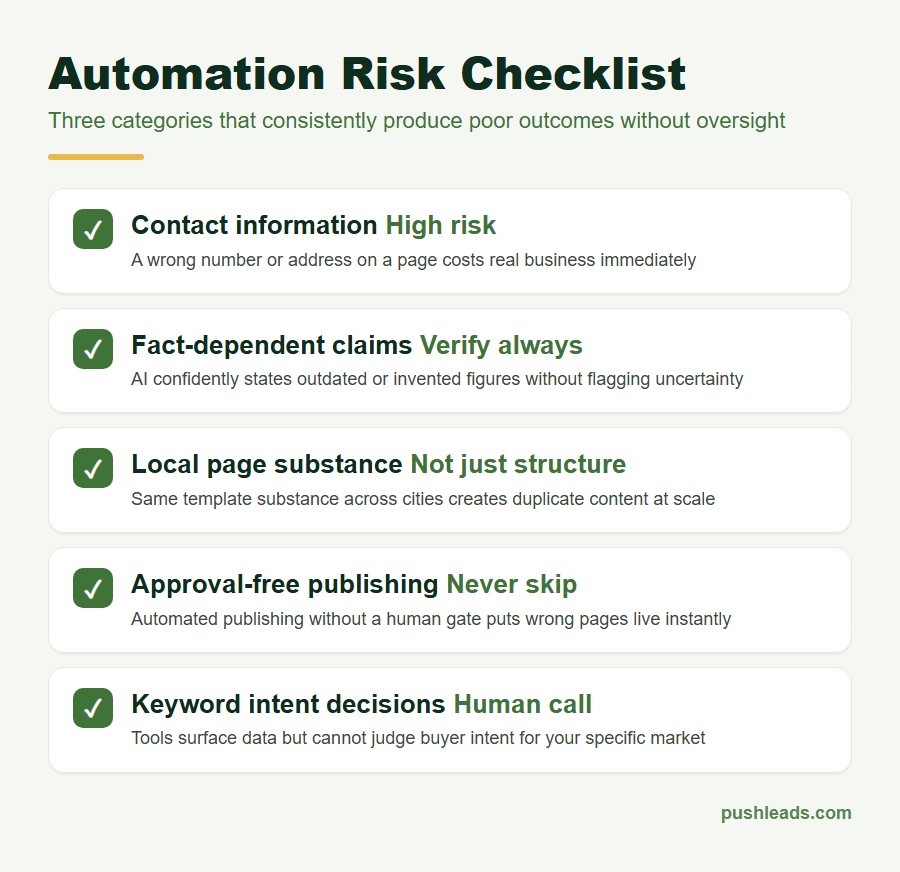
You can use the same structure, but not the same substance. Template means the layout: intro, service description, local context, proof, call to action. Each section needs location-specific content to avoid duplication problems. Local context should reference real details about that area. Proof should ideally include reviews or projects tied to that location. Using an identical template with only the city name changed is exactly the pattern that creates the suppression problem I described above.
Fact-Checking Cannot Be Delegated to the AI That Wrote the Content

AI language models are trained on data with a cutoff date, and they will confidently state things that are outdated, incorrect, or invented. In SEO content for service businesses, that means wrong service details, inaccurate regulatory information, made-up statistics, or citations to studies that do not exist. I have personally caught generated drafts citing research that has no source, or quoting prices that were years out of date.
The myth is that the AI knows your industry. It does not. It pattern-matches on training data and produces text that sounds authoritative whether or not the underlying facts are accurate. That is a meaningful distinction when the content is representing your business to potential customers.
What specific things should a human check in every AI-drafted piece?
Check every specific claim that could be verified independently: pricing references, product specifications, regulatory requirements, statistics, and any external citations. If the draft links to or mentions a study or report, verify that it exists and that the number quoted is accurate. Check that service area details match your actual coverage. Check that contact information is correct if it appears in the body of the page. At our scale, that review takes roughly ten minutes per page and has prevented published errors that would have been embarrassing to fix publicly.
Does Google penalize AI-generated content that contains factual errors?
Google does not have a specific AI-content detection penalty, but it evaluates page quality through user behavior and content accuracy signals. A page that states incorrect information tends to generate poor engagement, high bounce rates, and few conversions. Those signals contribute to lower rankings over time. More immediately, a factual error on a service page, like a wrong license number or an incorrect price range, damages trust with the customer who reads it, and that is a business problem before it is an SEO problem.

Every Piece of Content Needs an Approval Gate Before It Goes Live

Automated publishing without a human approval step is how clients wake up to a live page about the wrong service in the wrong city with the wrong contact information. We run more than 30 WordPress sites through PushRank, and every single piece of content has a mandatory approval check. The automation drafts, formats, and queues the page. A human approves it before it touches the live site.
That one step has caught wrong service areas, keyword stuffing from a poorly written prompt, off-brand tone, and once a configuration error that would have published a page to the wrong client’s site entirely. The approval gate caught it before it went live. Without that gate, we would have discovered the problem after the fact and spent time on damage control instead of prevention.
How long does a manual approval review actually take?
In practice, a focused ten-minute review catches most serious errors in a draft. That review should cover: does the page match the brief, is the service area correct, is the contact information accurate, does the call to action make sense, and does anything sound factually off that needs a quick verification. You are not editing for style in this pass. You are checking for the category of errors that cause real problems if they go live. Ten minutes per page is a small investment compared to the cost of a live error on a client-facing page.
What workflow tools can I use to build an approval gate into automated publishing?
The simplest approach is a staging step in your CMS. In WordPress, this means content is set to draft or pending review status automatically, and a human changes it to published after approving. More advanced setups use project management tools like Trello, Asana, or a custom review queue where drafts land for human sign-off before a publish action is triggered. The specific tool matters less than the rule: no automation should have direct access to publish to a live site without a human in the loop. That is a non-negotiable workflow boundary.
Rank Tracking Should Be Automated, but the Interpretation Should Not

Both extremes people fall into with rank tracking create problems. Tracking rankings manually in a spreadsheet is too slow at any real scale. If you are managing keywords across multiple locations or services, a manual position check misses trends and responds weeks late to a ranking drop. On the other end, full automation with no human review gives you numbers but no context. The tool shows you where your rankings are, but it does not tell you that a competitor just launched a new page, that Google rolled out a core update, or that your own site has an indexing problem.
The right setup automates data collection completely and schedules a human review of that data on a regular cadence. The automation provides the numbers. The human decides what they mean and what action to take.
How often should I review rank tracking data as a small business owner?
Weekly review is the right frequency for most small service businesses. Daily data collection through a rank tracking tool gives you a timely dataset, but daily human review is usually more than the signal warrants for a site with a stable content strategy. Weekly review lets you catch meaningful trends before they become significant problems, respond to drops within a reasonable window, and notice when a new page is gaining traction faster than expected. For businesses with active link-building or content campaigns, twice-weekly review during those periods makes sense.
What should I actually look for when I review rank tracking data each week?
Look for three things. First, any keyword that dropped more than five positions in the past seven days, because that warrants a quick investigation before the drop compounds. Second, any keyword that moved up significantly, because understanding why something worked lets you replicate it. Third, patterns across a group of keywords, like a whole service category dropping at once, which often indicates a technical issue or a content quality signal rather than individual page problems. Single-keyword fluctuations are usually noise. Patterns across multiple keywords in the same week usually mean something.

Keyword Research Tools Surface Data, They Do Not Do the Research

Keyword tools pull search volume, competition scores, and related terms quickly, and that is genuinely useful. The mistake is assuming the tool is doing the research. It is delivering data. Research is the interpretation of that data, and interpretation requires understanding buying intent, which the tool cannot reliably assess on its own.
As an example, the search phrase “handcrafted SEO versus automated SEO” might show an average position of 21 in a rank tracking report. An automation tool sees that term and might flag it as a ranking opportunity. A human reviewing that query asks: does this search reflect someone ready to hire, or someone still trying to figure out what they want? Those are different people who need different pages with different structures and different calls to action. That judgment call is not something automation makes correctly every time.
How do I segment keywords by intent before briefing content?
Sort your keyword list into three categories: informational (the person is researching), comparison (the person is evaluating options), and transactional (the person is ready to hire or buy). Those categories require different page structures. An informational page needs depth and education. A comparison page needs clear differentiation and proof. A transactional page needs a direct call to action above the fold and minimal friction. Briefing a page without specifying its intent category produces content that tries to serve all three audiences and serves none of them well.
If you are thinking through what a fair retainer includes with an SEO agency, keyword intent segmentation is one of the deliverables worth asking about specifically, because it determines whether the content produced will actually convert.
Can I automate the intent segmentation process for large keyword lists?
You can use automation to do a first-pass sort using modifier words. Keywords containing “how to,” “what is,” or “guide” are usually informational. Keywords containing “versus,” “compared to,” or “review” are usually comparison. Keywords containing “hire,” “cost,” “near me,” or a specific service name are usually transactional. That automated sort is a starting point, not a final answer. A human should review the borderline cases before briefing content, because a misclassified keyword produces a page optimized for the wrong audience.

The Quality of Automated Local Content Depends Entirely on the Brief

Automated local content built on a solid, location-specific brief with real service details and real intent can perform as well as a manually written page, and in some cases better, because it can be produced at greater scale and faster. Automated local content built on a generic prompt produces generic pages that do not rank for anything meaningful. The tool is not the variable. The brief is the variable.
This matters because many business owners evaluate automation tools based on the wrong factor. They compare output quality from two different tools using the same vague prompt and conclude that one tool is better. The more useful test is to give the same tool a weak brief and a strong brief and compare those results. The difference will be larger than any difference between tools.
What specific information makes a local service page brief strong enough to produce rankable content?
A strong brief for a local service page includes: the specific city or service area, the exact service being described, the target customer and their primary concern, one or two real differentiators for your business, the primary keyword and two to three supporting terms, the desired call to action, and any facts about the local area that are relevant to the service. That last item is what separates a page that feels local from one that just has a city name dropped into generic text. Real local context signals to both Google and to readers that the page was written with that location in mind.
Keeping profiles active automatically is a related discipline, because a strong Google Business Profile provides location-specific signals that reinforce what your local pages are saying about your service areas.
Should I automate content for every city in my service area at once?
Build and validate one or two location pages manually or with close supervision before scaling. Confirm the brief template produces content that is accurate, on-brand, and locally specific. Check that the similarity threshold between location pages is acceptable. Then scale to additional locations with the same brief template, adjusting only the location-specific inputs. Scaling before you have validated the template means scaling the problem if the template has an issue. A phased rollout catches problems when they affect two pages instead of twenty.
More Automation Does Not Always Mean Lower Cost
The assumption that maximum automation equals maximum savings ignores the cost of the errors that full automation produces. A page with a duplicate content problem, a factual error, a wrong service area, or an incorrect phone number is not a neutral page. It can suppress other pages on your site, damage your site’s overall quality signals with Google, and mislead customers who read it. The recovery cost of a site-wide quality problem is almost always higher than the human review hours that would have prevented it.
The actual ROI from automation comes from automating the right tasks, not from automating everything. High-volume, low-judgment tasks are where automation earns its cost: rank tracking, content drafting inside approved briefs, metadata generation, internal link suggestions, and review request sequences. Low-volume, high-judgment tasks are where humans earn their cost: strategy, fact-checking, approval, and anything touching contact information or client account configuration.
What does it actually cost to fix a site-wide content quality problem?
It depends on scale, but the work typically involves a content audit to identify all affected pages, a decision on each page about whether to update, consolidate, or remove it, the actual revision work, resubmission for indexing, and then a monitoring period to confirm rankings recover. For a site with fifty location pages that all have the same duplicate content problem, that process can take weeks and cost more in agency time than the original content production would have. Vetting an SEO agency properly includes asking how they handle quality control in their content workflows before a problem occurs.
Which tasks give the worst return when fully automated without supervision?
Three categories consistently produce the worst outcomes when automated without oversight. Contact information on pages, because a wrong number or service area published to dozens of pages creates customer-facing errors that are hard to track down. Factual claims and statistics, because an error that gets indexed and cached can persist even after you correct it on your site. And publication directly to live sites, because there is no second chance once a bad page is indexed. Automating review collection safely is a better example of automation with real ROI, because the judgment calls involved are low-stakes compared to these three categories.
Content Review Is Not a One-Time Step
Reviewing a page when it publishes and treating it as finished is a common mistake. SEO content is not static. Search results change as competitors update their pages and produce new ones. Google’s understanding of topics evolves through algorithm updates. A page that ranked at position four in January may need a content refresh in July to hold that position, because the pages around it have improved while yours has not changed.
Automated tools can flag when a ranking dropped, but they cannot tell you why it dropped or what specifically to change to recover it. That analysis requires a human who understands the page, the competition, and the intent behind the keyword. Auditing monthly SEO reports is part of this process, because a consistent reporting structure makes it easier to spot decay early enough to address it without a full page rewrite.
How often should I refresh existing content to protect rankings?
Quarterly reviews on your highest-traffic pages catch decay early enough to fix it without starting over. At that frequency, a page rarely needs more than targeted updates to specific sections rather than a full rewrite. Pages that have never ranked well are a different case and may need a more fundamental revision of the brief and structure before incremental updates will help. Set up a recurring calendar reminder for quarterly content reviews on your top twenty pages. That is the minimum maintenance schedule for a site that relies on organic traffic for leads.
What specifically should a content refresh address to recover a ranking that has dropped?
Start by looking at the pages currently ranking in the top five for the keyword. What are they covering that your page does not? Are they longer, more specific, or addressing a related question you are missing? Update your page to close those gaps without padding. Next, check whether the page’s title tag and header structure still accurately reflect the current search intent for that keyword, because intent does shift over time. Finally, check whether any facts, prices, or references on the page are outdated, since freshness is a signal Google weighs for certain query types.
Frequently Asked Questions
What SEO tasks are completely safe to automate without human review?
Rank tracking data collection, metadata generation based on a template, internal link suggestions based on existing content, and content drafting inside a pre-approved brief are the tasks where automation provides real efficiency with minimal downside risk. Even in these cases, the outputs benefit from periodic human review. Rank data needs weekly interpretation. Metadata should be reviewed before it goes live. Internal link suggestions should be validated against your site structure. Drafts need an approval pass before publication. No task is completely zero-risk, but these four carry the lowest stakes when handled by automation.
Can AI tools replace a human SEO strategist for a small business?
AI tools handle data collection and content execution well, but they cannot replace the strategic decisions a human makes: which pages the site needs, which keywords match actual buyer intent in that specific market, how the content fits together, and what to prioritize given budget and competitive conditions. A small business owner can use AI tools to do more of the execution work themselves, but someone still needs to make the strategic calls. That person can be the owner, a consultant, or an agency, but it cannot be the tool alone.
How do I know if an SEO agency is using automation responsibly on my site?
Ask directly whether they have an approval gate before content goes live, how they check for duplicate content across location pages, and how they handle fact-checking in AI-generated drafts. A responsible agency has clear answers to all three questions and can describe the specific steps in their workflow. If the answer is that content publishes automatically without a review step, that is a red flag. The presence of automation in the workflow is not a problem. The absence of human checkpoints is.
What is the biggest mistake businesses make when they start automating their SEO?
The most common mistake is automating before defining a strategy. Business owners set up a content generation tool, give it a list of keywords, and let it produce pages without a content map, intent segmentation, or brief template. The result is a large volume of pages that do not differentiate between services, do not reflect actual buyer intent, and in many cases create duplicate content problems across the site. Fixing that after the fact requires auditing and removing or rewriting dozens of pages, which costs more time than building the strategy first would have.
How should I handle review collection automation for my local service business?
Automated review request sequences are a good use of automation with a low error risk, because the judgment calls involved are straightforward. The sequence sends a follow-up message to a customer after a completed job and directs them to your preferred review platform. The main things to verify are that the message sounds like your business rather than a generic template, that the timing is appropriate relative to job completion, and that the sequence stops if a customer responds negatively. A well-built automated review system runs with minimal oversight and produces consistent results at scale.
Does automated content hurt SEO rankings?
Automated content itself is not what causes ranking problems. Poor-quality automated content does. The distinction matters because it means the problem is fixable with better process rather than by abandoning automation entirely. Content that is thin, duplicative, factually incorrect, or misaligned with search intent will underperform regardless of whether a human or an AI wrote it. Content that is specific, accurate, well-structured, and built on a strong brief can rank well even if the drafting was automated. The brief and the review process determine the quality, not the production method.
How do I audit my existing automated content to find quality problems?
Start with a crawl of your site using a tool like Screaming Frog to identify pages with thin content (under 300 words), duplicate title tags, or missing metadata. Then pull your rank tracking data and sort pages by traffic. Pages that have been live for more than three months and have received no organic traffic deserve a closer look at their content and brief. Run a similarity check between your location pages to find duplicate content patterns. Flag anything with factual claims that have not been verified recently. That audit gives you a prioritized list of pages to fix before scaling further.
What is the right ratio of automated to manual work in an SEO workflow?
There is no fixed ratio that applies to every business, but a useful frame is to automate by volume and keep humans involved by judgment. If a task happens dozens of times a month and the decisions involved are consistent, automation makes sense. If a task happens a few times a month and the decisions involved require context, competitive knowledge, or business-specific judgment, a human should own it. For most small service businesses, automated content drafting plus manual strategy and approval is the right balance, with fully automated rank tracking and reporting feeding a weekly human review session.
Build the Right System Before You Scale It
The practical split is straightforward once you see it clearly. Automate rank tracking, content drafting inside approved briefs, metadata generation, internal link suggestions, and review request sequences. Supervise keyword intent segmentation, local page brief creation, and the interpretation of ranking data. Never allow automation to publish directly to a live site, place contact information on pages, make factual claims without verification, or touch anything involving client account configuration.
That split is where the real return on investment lives, not in automating everything and hoping the output is acceptable. The businesses that get the best results from SEO automation are the ones that invest in the brief, the content map, the approval gate, and the weekly review process, and then let automation handle the execution at scale inside those guardrails.
If you are not sure where your current workflow stands, or you want a second set of eyes on what is worth automating on your specific site, reach out to us at PushLeads. We can look at what you have in place and tell you exactly what is safe to automate, what needs supervision, and what to fix first. Contact us at https://pushleads.com/contact/ and we will start there.
Related reading from PushLeads
- How to Vet an SEO Agency for Contractors: No-BS Guide
- Monthly SEO Retainer for Contractors: What to Expect
- The Agency Proof Checklist: How Contractors Audit Monthly SEO Lead Reports
- I Ran DIY SEO vs Agency and Here’s What It Cost
- How to Get More Google Reviews for Your Local Service Business (The Automated System That Turns Every Completed Job Into a 5-Star Rating)
- Why Active Google Business Profiles Dominate Local Search (And the 15-Minute Weekly Routine That Keeps Yours Ranking)
Keep Reading
Want more customers from Google & AI search?
Get a free SEO audit of your site — see exactly what to fix first.
Your path · What Is SEO? The Complete Guide to Search Engine Optimization for Businesses
Keep going: read these next

- SEO Analytics and Reporting Research Report: Measuring Success That Actually Drives Business Results
- AI-SEO: How Artificial Intelligence is Revolutionizing Search Rankings in 2026



Want this done for you?
Scan your site. See the gaps. Decide with numbers.
- Rankings, Google Business Profile and site-speed teardown
- Report lands in your inbox in about a minute
- No obligation · 4.9 from 67 Google reviews


