Key Takeaways
If your business is not showing up on Google, one of five specific problems is almost certainly responsible: broken verification, wrong primary category, proximity to the map pack radius, a suspended profile, or a duplicate listing splitting your authority. Fixing them in the right sequence is what separates a two-minute repair from a two-week slog. This post walks through each issue and the exact order I use on client accounts at PushLeads.
- Broken verification silently overrides every other optimization you have done.
- A wrong primary category can make a fully complete profile invisible for the searches that matter most.
- Duplicate listings dilute every citation and review you build, often without any visible warning.
- Suspended profiles can disappear from your dashboard without a clear explanation.
- Physical proximity to the searcher still carries heavy weight in map pack results.
- Fixing things in the correct sequence prevents wasted work on a profile that is not eligible to rank.
- Impressions inside your Google Business Profile performance tab are the clearest early signal that your fixes are working.
Key moments (13)
0:30 The Real Stakes: What Invisibility Costs You
1:19 The Five Reasons, Ranked by How Often I See Them
1:57 Reason One: Verification Is Broken
2:45 Reason Two: Your Primary Category Is Wrong
3:34 Reason Three: Proximity and the Map Pack Radius
4:39 Reason Four: Your Profile Is Suspended
5:50 Reason Five: A Duplicate Listing Is Stealing Your Authority
6:36 My Fix Order: What I Do First on a New Account
7:35 The Numbers That Tell You If It’s Working
8:23 The Duplicate Problem Goes Deeper Than You Think
8:59 A Worked Example: How the Fix Order Plays Out
10:14 What to Do Right Now
Full transcript
0:00 Intro
If your business isn’t showing up in Google searches, one of five things is broken and I’m going to walk you through all five plus the exact fix order I use on client accounts. And that’s what this whole video covers. So stick around because the fix for one of those takes is just about two minutes and the fix for the other one can take about two weeks if you skip the steps. The real stakes, what invisibility cost you.
This is part of our guide to Google Business Profile. Want it done for you? See our local SEO services.
0:30 The Real Stakes: What Invisibility Costs You
Now before we get into the five reasons, let me give you a number that puts this in perspective. Google Business Profile searches in my search data show searches like Google business profile optimization, pulling over 1400 impressions at $23 a click if you’re doing Google ads. Now that’s not a cheap traffic category. So when local contractors and service businesses are not showing up in near me searches, they’re handing that traffic to a competitor who did the work. And here’s the thing that most business owners miss. It’s rarely one catastrophic problem. It’s usually a small configuration issue or a stale listing that Google stopped quietly trusting. The five reasons ranked by how often I see them.
1:19 The Five Reasons, Ranked by How Often I See Them
In my experience of working on local service accounts, here’s how often each failure shows up. One, the verification is broken or expired. Two, your primary category is wrong or too broad. Three, proximity, meaning that you’re just outside the map pack radius. Four, the profile that you have is suspended often without a clear notice. And five, a duplicate listing is splitting your authority. I’m going to cover each one in order, then I’ll give you my actual fixed sequence, so you’re not wasting time diagnosing the wrong thing first. Reason one, verification is broken.
1:57 Reason One: Verification Is Broken
Verification is the most common thing I see and it’s the first thing I check. So Google needs to confirm that your business actually exists at a real business address. So if you verified years ago via postcard and then moved or you changed your phone number or you switched to a different Google account, your verification may have silently lapsed. So go to business .Google .com right now. If you see a banner that says this business is not verified, there’s your answer. The fix is re -verifying, usually via a video verification today, which means you have to record a short walkthrough of your business location. Do not skip this step. Every other optimization that you do is irrelevant if your verification is broken. Reason number two, your primary category is wrong.
2:45 Reason Two: Your Primary Category Is Wrong
Category selection is the second most common issue I see, and it’s the sneakiest because your profile can look completely fine and still be invisible for the searches that matter. So Google uses your primary category to decide what searches you’re eligible to show up for. So if you’re an HVAC company and your primary category is set to contractor, instead of HVAC contractor, you’re competing in a much broader bucket with almost no relevant signals. The fix here is to go to your profile, edit your business category, and then pick the most specific one that matches what you actually do. And then you can add secondary categories. Most profiles I look at are using just one category, but you can add up to 10 and add every service vertical that you legitimately cover. Reason number three, proximity and the map pack radius.
3:34 Reason Three: Proximity and the Map Pack Radius
This one is frustrated because there’s no quick fix, but understanding it stops you from chasing ghosts, a Google’s local pack, which is the three business box that shows up in near me searches is heavily weighted by physical proximity to the person searching. If your office is six miles from downtown and someone searches for plumber near me from downtown, you may not appear even with a perfect profile. The keyword Google Business Profile Optimization St. Augustine shows up in my search data at 245 impressions. So that’s local businesses fighting for proximity in a specific city. Each local market has this dynamic going on. So what you can do, make sure your business address is correct to the exact suite. Use your service area settings accurately, build local page content on your website that targets specific neighborhoods where you want to actually show up. So proximity isn’t fully in your control, but you can close the gap with content and signals. Reason number four, your profile is suspended.
4:39 Reason Four: Your Profile Is Suspended
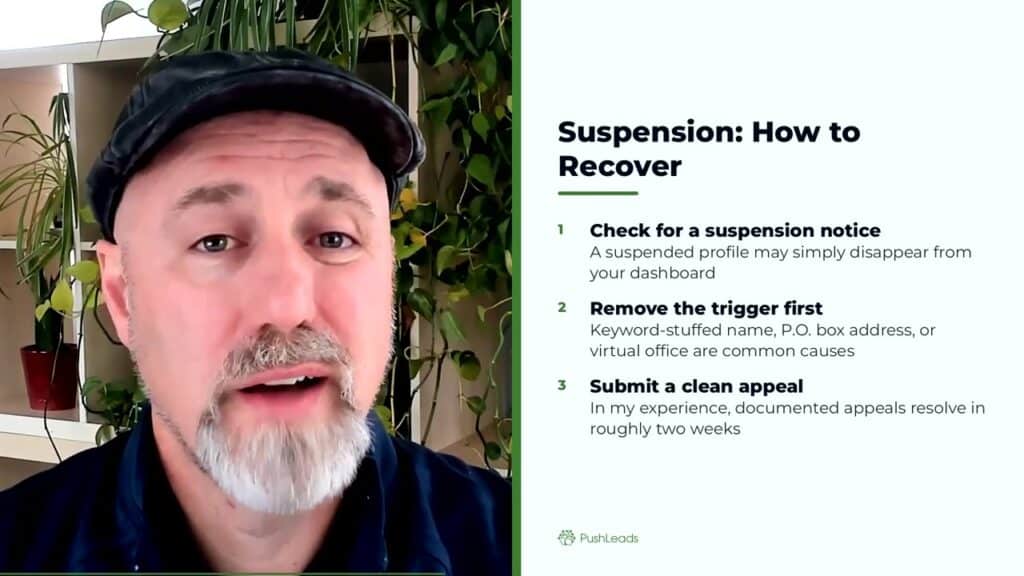
Suspension is the scariest one, and Google is not always obvious about it. If your profile is suspended, you either violated a guideline or Google flags something that looks like a violation, sometimes incorrectly. Common suspension triggers our keyword stuffing in your business name, using a post box or virtual office as your address, having a service area business, but showing a residential address, or getting flagged after a competitor reports you. How to check? Go to business .Google .com. A suspended profile will show a suspension notice or just disappear from your dashboard. The fix here is to submit a reinstatement request through Google’s official appeal form. Before you submit, clean up whatever triggered it. If your business name has keywords jammed in it that aren’t your actual business name, remove them. If your address is a virtual office corrected, then submit the appeal and wait. In my experience, clean appeals with documentation get resolved in about two weeks, sometimes faster. Reason five, a duplicate listing is stealing your authority. Duplicates happen more than people realize.
5:50 Reason Five: A Duplicate Listing Is Stealing Your Authority
Google sometimes auto generates listings from third -party data. Old owners sometimes leave listings active, and your own team may have created a second profile years ago and just forgot about it. The problem is that Google doesn’t know which listing to rank, so it often ranks neither. How to find duplicates? Search for your business name in Google Maps and look for any listing that isn’t yours, but also shows your address or phone number. Also search for your phone number directly. The fix here is to claim the duplicate if you can, then request to merge it with your primary listing through the Google Business Profile Support process. If you can’t claim it, you can flag it as a duplicate listing using the suggest and edit function on the duplicate listing. My fix order. What to do first on a new account?
6:36 My Fix Order: What I Do First on a New Account
Here’s the sequence I actually use when a business owner tells me they’re not showing up. Step one, verify the verification status. It takes two minutes to check, and if it’s broken, nothing else matters. Step two is out of the primary category. One wrong category can wipe out months of other optimization work. Step three, search for duplicates on maps. I do this before anything else that involves building citations or links because duplicates absorb signals. Step four, check for a suspension notice. If it’s suspended, file the appeal before continuing. Step five, look at proximity relative to target searches. If the business is structurally outside the radius, I start building GEO -targeting landing pages on the website to close the gap. That order matters. Don’t optimize a suspended profile. Don’t build links to a profile that has a live duplicate eating its authority. The numbers that tell you if it’s working.
7:35 The Numbers That Tell You If It’s Working
Once you’ve made the fixes, here’s what’s to watch. Google gives you impression data inside the profile under performance. If the verification or category fixes are working, you’ll see impressions climb within two to four weeks for most markets. The Google Business Profile statistics keyword in my search data shows over a hundred impressions at $64 a cost per click equivalent. Business owners are actively searching for how to read those numbers. The answer is watch the impressions trend, not just the calls over a 30 day window. For suspended profiles, the moment reinstatement goes through, you often see a significant jump in the impressions within days because the underlying profile data was always there, just suppressed. The duplicate problem goes deeper than you think.
8:23 The Duplicate Problem Goes Deeper Than You Think
I want to come back to duplicates because this one compounds. Every citation or link that you build to your correct profile while a duplicate exists gets diluted. Google is trying to decide which listing represents the real business. If you’re running any kind of review campaign or citation building effort and your results look flat, check for duplicates before spending any more money. The fix is not glamorous, but in a typical case, merging or removing a duplicate can free up authority that was always stuck. And you’ll see rankings move without changing anything else. Picture a typical garage door company.
8:59 A Worked Example: How the Fix Order Plays Out
They called because they couldn’t find themselves in any near me search. Here’s how the math works for a shop doing roughly 40 service calls a month, both coming from referrals because the online channel was invisible. First check is the business verification. It was labs. They had moved suites 18 months earlier and never reverified the new address. It was fixed in a one day video verification. Second check is primary category. It was set to door supplier instead of garage door repair service, updated in five minutes. Third check duplicates. We found an older listing from an original owner still active with the old address filed under merge request took 11 days to resolve. Four check suspension, none clean. Fifth check proximity, their shop with three miles from the city center. So we built two neighborhood specific service pages on their website to pull in radius searches. Within 30 days of the duplicate merge clearing impressions in the profile were up calls from the online channels are coming in and they had a baseline to build from. And that’s not a guarantee of your result. That’s an illustration of how the sequence works when you hit multiple issues at once. What to do right now?
10:14 What to Do Right Now
You don’t need to guess which of the five you have. You can go to business .Google .com and check verification first, spend five minutes on category search for your business name and maps and look for duplicates and then check for a suspension banner. If you want a faster answer, you can get your free AI visibility check at PushLeads .com slash check and we’ll look at your business profile, your website signals, and your local search footprint and tell you exactly what’s broken and what to fix first. The number here to call if you want to talk to us is eight to eight three four eight seven six eight six. And if you’re a contractor, a service business or any local company that depends on phone calls, this is the most direct path to figuring out why Google isn’t sending you traffic. Fix the five things that covered use the sequence. And if you want help, go to PushLeads .com slash check and that’s where you start. I’m Jeremy Ashburn with PushLeads. I help small businesses get more leads without struggle and frustration. Talk to you soon.

Why Your Business Is Not Showing Up on Google

When a business is not showing up on Google, one of five configuration problems is almost always the cause, and the fastest path forward is checking them in a specific order rather than guessing. I have worked through enough local service accounts at PushLeads to know that the problem is rarely dramatic. It is usually a stale verification, a category set too broadly, or a forgotten duplicate listing quietly absorbing the authority your real profile should be getting. Google does not send you a clear alert when any of these things go wrong. The listing just fades, calls stop coming in, and the business owner is left wondering what changed.
Before getting into each issue, consider the financial weight of this. Keyword research on terms like “Google Business Profile optimization” shows over 1,400 impressions and an equivalent paid value of around $23 per click. When a local contractor does not show up in near-me searches, that traffic does not disappear. It goes straight to a competitor who did the work. The encouraging part is that most of these problems are entirely fixable once you know what you are looking at. The rest of this post covers each of the five reasons and the exact fix sequence I run on every new account.
Want more customers from Google & AI search?
Get a free SEO audit of your site — see exactly what to fix first.
Broken Verification: The Most Common Reason I See

Broken or expired verification is the single most frequent issue on local business profiles, and it is the first thing I check because if verification is broken, nothing else you do will move the needle. Google requires confirmation that your business exists at a real address. If you verified years ago via postcard and then moved locations, changed your phone number, or switched to a different Google account, your verification may have silently lapsed without any obvious notification in your dashboard.
How do I know if my Google Business Profile verification is broken?
Go to business.google.com and look for a banner that reads “this business is not verified.” If you see that banner, that is your answer. The profile is still there and may look complete, but Google is not surfacing it in searches because it has not confirmed the listing is legitimate. This check takes about two minutes and should always be step one.
How do I re-verify my Google Business Profile in 2024?
Google now primarily uses video verification for new and lapsed verifications. You record a short walkthrough of your business location showing the exterior, interior, and evidence that the business operates there. The process is guided inside the Google Business Profile dashboard. It is straightforward but it cannot be skipped. Some accounts still qualify for phone or email verification depending on the business type, but video has become the standard method for service businesses.
What happens to my profile if verification lapses?
An unverified profile can still appear in some searches, but Google significantly reduces its trust and visibility. Any new edits you make are less likely to be published, and the profile will not compete effectively in map pack results. Think of verification as the foundation. Every other optimization sits on top of it, and if the foundation is not solid, the rest of the work is wasted. Fix this first, always. You can run through a full Google Business Profile audit checklist after verification is confirmed, but do not start the audit before you know the profile is verified.

Wrong Primary Category: The Sneakiest Visibility Problem

Category selection is the second most common issue I encounter, and it is particularly frustrating because a profile with a wrong primary category can look completely finished and still be invisible for every search that actually matters. Google uses the primary category to determine which searches a profile is eligible to appear in. Set it too broadly and you are competing in a massive bucket with almost no relevant signals pointing your direction.
What happens if my Google Business Profile category is too broad?
If you are an HVAC company and your primary category is set to “Contractor” rather than “HVAC Contractor,” Google does not have enough information to match you to searches from people looking specifically for heating and cooling help. You are in the same pool as general contractors, roofers, and painters, and your relevance score for HVAC-specific searches drops significantly. Changing this single field has produced visible ranking changes on profiles that had been stuck for months.
How many categories should I add to my Google Business Profile?
Google allows up to ten categories on a single profile. Most profiles I look at are using just one. The primary category carries the most weight, so choose the most specific one that accurately reflects your core service. Then add secondary categories for every legitimate service vertical you cover. A plumbing company might add water heater installation, drain cleaning service, and emergency plumber as secondaries. Each additional category expands the set of searches the profile can match without diluting the primary signal.
How do I find the right Google Business Profile category for my business?
Start typing your service type into the category field inside your profile editor. Google’s category list is specific, so scroll through the suggestions carefully. If you install garage doors, “Garage Door Supplier” and “Garage Door Repair Service” are both options, and they pull very different searches. Choosing the wrong one, as I saw in a real client account covered later in this post, can suppress a profile entirely for the searches the business depends on. Pick the category that matches what a customer would type when they need your service today.
Proximity and the Map Pack Radius: What You Can and Cannot Control

Proximity to the person searching is a core factor in Google’s local pack results, and it is the one item on this list you cannot fully override with settings changes. The three-business box that appears at the top of local search results is heavily weighted toward businesses physically close to the person performing the search. If your office is six miles from downtown and someone searches from downtown, you may not appear even with a well-optimized profile.
Why does my Google Business Profile ranking change depending on where someone searches from?
Google calculates proximity dynamically based on the searcher’s location at the time of the search. A business that ranks first for someone a mile away might not appear in the results at all for someone five miles away searching the same phrase. This is not a bug. It is an intentional design to surface businesses that are geographically convenient. Understanding this stops you from chasing ranking improvements that are actually just proximity fluctuations.
How do I rank in areas farther from my physical location?
You cannot move Google’s radius weighting, but you can build signals that extend your reach. Creating neighborhood-specific service pages on your website that target the areas where you want to show up is the most practical approach. If your shop is three miles from the city center, a page about your services in that specific downtown area gives Google a content signal that connects your business to those searches. This strategy is what I used for a garage door company in the worked example later in this post. For a deeper look at why some markets are harder than others, the local SEO gaps explained page at PushLeads walks through how radius dynamics play out across different competitive environments.
Should I expand my service area settings in Google Business Profile to rank in more places?
Service area settings tell Google where you serve customers, but they carry less ranking weight than your physical address location. Setting an overly large service area does not make you rank across that entire region. It is worth keeping your service area accurate and reasonable, but do not expect it to substitute for content signals and physical proximity. The combination of correct service area settings plus geo-targeted website content is more effective than either one alone.
Suspended Profiles: What to Do When Your Listing Disappears

A suspended Google Business Profile is the scariest scenario on this list, partly because Google is not always explicit about telling you it happened. The profile can simply vanish from your dashboard or from search results, and there is no automatic email explaining why. Suspension happens when Google believes your profile has violated its guidelines, though that determination is sometimes incorrect and can be reversed.
What triggers a Google Business Profile suspension?
The most common triggers I see are keyword stuffing in the business name field, using a PO box or virtual office as the listed address, running a service-area business but displaying a residential address publicly, and getting flagged by a competitor through the suggest-an-edit function. Any of these can trip an automated review. Google’s systems are looking for signals that a listing might be misleading or spam-like, and even a legitimate business can get caught if the profile does not match Google’s formatting expectations.
How do I check if my Google Business Profile is suspended?
Go to business.google.com. A suspended profile will show a suspension notice inside your dashboard, or the listing will simply be absent from the management interface. You can also search for your business name directly in Google Maps. If the profile does not appear there but you know it was verified before, suspension is likely. Some suspensions are “soft” and limit visibility without full removal, while others are “hard” and pull the listing entirely from results.
How long does Google Business Profile reinstatement take?
In my experience, clean appeals with supporting documentation resolve in roughly two weeks, sometimes faster. Before submitting the reinstatement request through Google’s official appeal form, clean up whatever triggered the suspension. Remove keywords from your business name if they were added there to rank. Correct the address if it was set to a virtual office. Submit the corrected profile along with documentation showing your business is legitimate, such as a business license or utility bill showing the address. Submitting a sloppy appeal without fixing the underlying issue almost always results in denial. There are also situations where negative or policy-violating reviews contributed to scrutiny on the profile, and knowing how to remove bad Google reviews is worth understanding before you submit your appeal.
Duplicate Listings: The Silent Authority Drain

Duplicate listings happen more frequently than most business owners realize, and they create a problem that compounds over time. Google sometimes auto-generates listings from third-party data sources. Previous owners of a business location sometimes leave listings active. Your own team may have created a second profile years ago during a rebranding and simply forgot about it. When two listings exist for the same business, Google does not know which one to rank, and the common outcome is that neither one ranks well.
How do I find a duplicate Google Business Profile for my business?
Search for your business name directly in Google Maps. Look for any listing that shows your phone number or address but that you did not create or do not currently manage. Also try searching your phone number by itself in Maps. That often surfaces old profiles that are no longer tied to an active account but are still indexed. If you find one, that is a duplicate pulling authority away from your real listing.
How do I merge or remove a duplicate Google Business Profile?
If you can claim the duplicate, do that first. Once claimed, you can submit a merge request through Google Business Profile Support to combine it with your primary listing. If you cannot claim the duplicate because the email address connected to it is inaccessible, use the “suggest an edit” option on the duplicate listing and flag it as a duplicate. The process is not instant. In a real case I worked through, the merge request took 11 days to clear. But once it did, the rankings moved without any other changes to the account.
Why do duplicates affect my citation building and review campaigns?
Every citation link or review that points to your business gets diluted when a duplicate exists, because Google is distributing authority signals across two listings instead of concentrating them on one. If you have been running any kind of review campaign or citation building effort and the results look flat, check for duplicates before spending more money on that effort. This is also one of the common fixable local SEO problems that show up when I audit accounts that look well-optimized on the surface but are not producing calls.
The Fix Sequence I Use on Every Account

The order in which you address these five problems matters as much as the fixes themselves. Optimizing a suspended profile wastes time. Building citations to a profile that has a live duplicate eating its authority wastes money. Here is the sequence I follow every time a business owner tells me they cannot find themselves in Google results.
What should I check first when my business is not showing up on Google?
Check verification status first. Go to business.google.com and confirm there is no “not verified” banner. This takes two minutes and determines whether anything else you do will register. If verification is broken, re-verify before touching any other setting. This is not an optional step based on how much time you have. It is the structural requirement that everything else depends on.
After verification, what is the next step in fixing my Google Business Profile?
After confirming verification, audit your primary category. One wrong category can suppress a profile for months regardless of how complete the rest of the information is. Then search for duplicates in Maps before you do anything that involves building external signals. Next, check for a suspension notice. If the profile is suspended, file the appeal and wait for reinstatement before continuing with any other work. Only after clearing those four checks does it make sense to look at proximity and start building geo-targeted content to extend your radius reach.
How long does it take to see results after fixing a Google Business Profile problem?
Category and verification fixes typically show up in profile impression data within two to four weeks in most markets. Suspension reinstatements often produce a faster jump in impressions because the underlying profile data was intact the entire time and was simply being suppressed. Duplicate merges can take one to two weeks to process and may show ranking movement within days of the merge completing. Proximity-based fixes through geo-targeted content take longer, usually 30 to 90 days depending on how competitive the market is.

Reading the Numbers: How to Know If Your Fixes Worked

Google provides impression data directly inside your Business Profile under the Performance tab, and that is where you should be looking to confirm that your fixes are producing results. Impressions tell you how many times your profile appeared in search results, which is the upstream metric that leads to clicks and calls. Calls alone over a short window can be misleading because they depend on conversion behavior as well as visibility.
What metrics inside Google Business Profile tell me my ranking improved?
Watch the impressions trend over a 30-day rolling window rather than comparing single days. After a category fix or verification correction, you are looking for a consistent upward slope in that number, not a single spike. Calls and direction requests will follow impressions once visibility is restored. If impressions are climbing but calls are flat, the next thing to investigate is whether the profile has enough reviews and whether the photos represent the business accurately. Encouraging photo reviews for Google ranking is one of the most practical ways to improve conversion from impressions to actual contact.
What does a sudden drop in Google Business Profile impressions usually mean?
A sudden drop without any changes you made is usually a sign of one of three things: a new duplicate appeared, a suspension was triggered, or a competitor with a stronger proximity advantage entered the market. Check for new duplicates first because that is the most common cause of a sharp unexplained drop. If the profile appears healthy and no duplicate is visible, look for a suspension notice. If neither of those applies, run a competitive check to see if a new business opened closer to the center of your target area.
Should I be watching Google Business Profile performance every day?
Daily monitoring is not necessary and can lead to overreaction on normal fluctuation. Weekly checks of the impressions trend and a monthly review of calls and direction requests is a reasonable routine for most small businesses. If you recently made fixes, check weekly for the first month to confirm the trend is moving in the right direction. After that, a monthly review is sufficient unless you notice a sudden drop in incoming calls, which should trigger an immediate check of verification and duplicate status.

A Real Example: How the Fix Sequence Played Out
A garage door company came to us because they could not find their business in any near-me search. They were doing roughly 40 service calls a month and all of it was coming from referrals because the online channel was completely invisible. Here is exactly what we found and in what order.
What was wrong with the garage door company’s Google Business Profile?
The first check revealed broken verification. The business had moved to a new suite 18 months earlier and never re-verified the updated address. That alone would have explained the invisibility. We completed video verification and the fix was done in one day. The second check found that the primary category was set to “Door Supplier” rather than “Garage Door Repair Service.” That was updated in about five minutes. Two significant problems, both fixed within the first day.
What else did we find in the garage door company audit?
The third check turned up a duplicate listing from the previous owner of the business, still active with the old address. We filed a merge request and it took 11 days to resolve. The fourth check came back clean, no suspension. The fifth check on proximity showed the shop was about three miles from the city center, which was close enough to work with but required additional content support. We built two neighborhood-specific service pages on their website targeting the downtown area and surrounding zip codes.
What results did the garage door company see after fixing their Google profile?
Within 30 days of the duplicate merge clearing, impressions in the Business Profile performance tab were up and calls from the online channel started coming in for the first time. That is not a guaranteed outcome for every business, because every market and competitive environment is different. But it illustrates why the sequence matters. Fixing verification and category without addressing the duplicate would have produced partial results at best, because the duplicate was absorbing signals the entire time. All five items on the checklist needed to be resolved, and they needed to be resolved in the right order. It is also worth noting that as AI-powered search evolves, what shows up in Google’s AI summaries about your business matters just as much as your map pack placement. Learning how to fix Google AI summary errors is becoming a necessary step for businesses that want complete visibility, not just map pack presence.
Beyond Google: AI Search Visibility for Local Businesses
Fixing your Google Business Profile is the foundation, but search behavior is shifting. ChatGPT, Perplexity, and similar AI tools are increasingly being used to find local service recommendations, and the factors that drive visibility there are related to but distinct from traditional Google Business Profile optimization. A business that shows up well in Google’s map pack but has thin web presence can still be invisible in AI-generated recommendations.
Does fixing my Google Business Profile help me show up in AI search results?
A verified, correctly categorized Google Business Profile with strong reviews and accurate business information does contribute to AI search visibility, but it is not sufficient on its own. AI tools pull from a wider range of sources including your website content, mentions on other sites, and structured data signals. A business with a strong profile but no meaningful web content outside of that profile will still be overlooked when AI tools generate service recommendations.
What do I need to do to get my business recommended by ChatGPT or Perplexity?
Getting recommended by AI tools requires consistent, accurate business information across multiple platforms, substantive website content that describes what you do and where you do it, and enough third-party mentions that AI systems can verify your relevance. The get recommended by ChatGPT guide at PushLeads covers the specific steps for contractors and service businesses in detail. The core idea is that AI tools are looking for corroboration. If your business information only exists in one place, there is not enough signal for an AI to confidently recommend you.
How is AI search visibility different from traditional local SEO?
Traditional local SEO focuses heavily on proximity, review count, and profile completeness inside Google’s ecosystem. AI search visibility depends more on the breadth and consistency of your digital footprint across multiple sources, the quality and depth of your website content, and whether authoritative third-party sources reference your business. The two are complementary but require different tactics. Fixing your Google Business Profile is still the right starting point because it anchors your local presence, but treating it as the finish line leaves significant visibility on the table as more users shift toward AI-assisted search.
Frequently Asked Questions
How long does it take for my Google Business Profile to show up after I verify it?
After completing video verification, most profiles become eligible to appear in search results within one to three days, though the full competitive ranking effect can take two to four weeks to stabilize. If your profile was previously unverified for an extended period, the initial appearance in results can happen quickly but ranking position builds more gradually as Google re-establishes trust in the listing. Watching the impressions trend in the Performance tab is the clearest indicator of progress.
Can my business show up on Google without a website?
A business can appear in Google Maps and the local pack with only a Google Business Profile and no website, but the ranking ceiling is lower without a website. Google uses website content to validate what a business does and where it serves customers. For near-me searches in competitive markets, businesses with well-optimized websites consistently outrank those relying only on a profile. A website also provides the geo-targeted landing pages needed to extend visibility beyond the immediate proximity radius.
Why does my business show up on Google Maps but not in regular Google search results?
Google Maps visibility and organic Google search visibility are powered by different signals. A profile can appear in Maps while remaining absent from the standard search results if the website lacks SEO-relevant content or if the business name does not match common search queries. The map pack that appears in regular search results is a subset of Maps rankings filtered for proximity and relevance to the specific search phrase. Improving your website’s on-page signals is the most direct path to closing that gap.
How many Google reviews do I need to rank in the local map pack?
There is no published minimum review count for map pack eligibility, but in most competitive local service markets I work in, businesses with fewer than ten reviews struggle to hold consistent map pack positions. Review recency and rating quality matter alongside total count. A business with 25 reviews averaging 4.8 stars and recent activity in the last 90 days will generally outperform one with 50 older reviews and a 3.9 average. The pattern Google rewards is a steady, ongoing flow of honest reviews rather than a one-time burst.
What is the difference between a Google Business Profile suspension and low ranking?
A suspended profile is removed from search results entirely or nearly so, and shows a suspension notice inside your management dashboard. Low ranking means the profile is eligible to appear but is not winning the competition for position. The symptoms can look similar from the outside, which is why checking your dashboard directly is important. A suspended profile needs reinstatement before any other optimization makes sense. A low-ranking profile that is not suspended needs content and authority improvements to move up in results.
Can a competitor get my Google Business Profile suspended?
A competitor can submit edits or flag your profile through Google’s suggest-an-edit function, which can trigger a review by Google’s automated systems. If your profile has any technical issues such as keyword-stuffed business names or address irregularities, that report can accelerate a suspension. Google is supposed to verify reports before acting, but automated systems sometimes flag profiles incorrectly. If you believe a competitor-initiated report caused an unjust suspension, you can note that in your reinstatement appeal and provide documentation of your legitimate business operation.
Does changing my Google Business Profile category hurt my ranking?
Changing to a more accurate and specific category almost always improves ranking over time, though there can be a short adjustment period of one to two weeks while Google re-indexes the updated signals. The risk of leaving a wrong or overly broad category in place is much greater than any temporary fluctuation from making the correction. If you are unsure whether a category change will help, compare your current category against the categories used by businesses ranking in the top three positions for your target keywords. That comparison usually makes the right choice obvious.
How do I know if my business information is consistent across the web?
Search for your business name, address, and phone number in Google and check the results against what is on your Google Business Profile. Inconsistencies in name spelling, address format, or phone number across directories like Yelp, the Better Business Bureau, and industry-specific sites send conflicting signals to Google and reduce the trust score of your profile. Tools like Moz Local or BrightLocal can audit your citation consistency automatically, but a manual search of the top five or six directories is a reasonable starting point for most small businesses.

Start Fixing Your Visibility Today
If your business is not showing up on Google, you now have the five-item checklist and the exact sequence to work through it. Start at business.google.com and confirm verification status. That check takes two minutes and nothing else matters if it fails. Move to category, then duplicate search, then suspension check, then proximity and content. Work through them in that order and you will not waste effort on optimizations that cannot produce results yet.
Most of the businesses I work with at PushLeads come to me after months of trying random fixes that did not stick, usually because they started at step three or four without realizing steps one and two were broken underneath. The sequence is the difference between progress and spinning wheels.
If you want a faster answer, we offer a free AI visibility check at PushLeads where we look at your Business Profile, your website signals, and your local search footprint and tell you exactly what is broken and what to fix first. If you are a contractor or local service business that depends on the phone ringing, that is the most direct path to understanding why Google is not sending you traffic. Reach out to us at pushleads.com/contact and we will take a look at your specific situation.
Keep Reading
Want more customers from Google & AI search?
Get a free SEO audit of your site — see exactly what to fix first.
Your path · What Is SEO? The Complete Guide to Search Engine Optimization for Businesses
Keep going: read these next

- SEO Analytics and Reporting Research Report: Measuring Success That Actually Drives Business Results
- AI-SEO: How Artificial Intelligence is Revolutionizing Search Rankings in 2026



Want this done for you?
Scan your site. See the gaps. Decide with numbers.
- Rankings, Google Business Profile and site-speed teardown
- Report lands in your inbox in about a minute
- No obligation · 4.9 from 67 Google reviews