0:00 Intro
1:42 Chapter 1 The Before & After
7:01 If a channel shifts towards original content, the system will re-evaluate its reach. – Ren Ritchie, YouTube Creator Liaison
Full transcript
0:00 Intro
In September, my best YouTube Shorts were getting over five hundred views each. But by late October, every new Short I posted was getting somewhere between one and forty-two views. And that same week, five of my videos just disappeared. No email from Google or YouTube, no strike, nothing in YouTube Studio. And of course, I run a marketing agency, so I’m supposed to know this stuff, but I’m still getting familiar with YouTube. But the issue is, I’m not as familiar with YouTube, and the reason why is that until real recently, posting on YouTube was kind of a waste of time, at least in my opinion, because you would post videos and comments and do all the things, and basically nothing would happen. You would get one or five or ten views, and maybe if you did Shorts it would make a difference. As of about last year, about December of twenty twenty-five, I started realizing, hey, YouTube Shorts and YouTube long-form content, primarily long-form content, is how you start showing up in Google’s AI overview. And so I’ve really been doing a lot of experimentation and marketing, and I ran into a wall. So basically, YouTube blocked me because I was doing too much, right? But obviously we don’t really know where the wall is or where the edge of the road is until we run off the road, and that’s kind of what happened here. So I dug in, figured out exactly what caused YouTube to be suppressing my Shorts, and I’m gonna show you exactly what we changed. So if you’re a contractor who’s using AI video tools, or you’re paying someone to run a faceless YouTube channel for you, pay attention because you might fall into the same trap.
1:42 Chapter 1 The Before & After
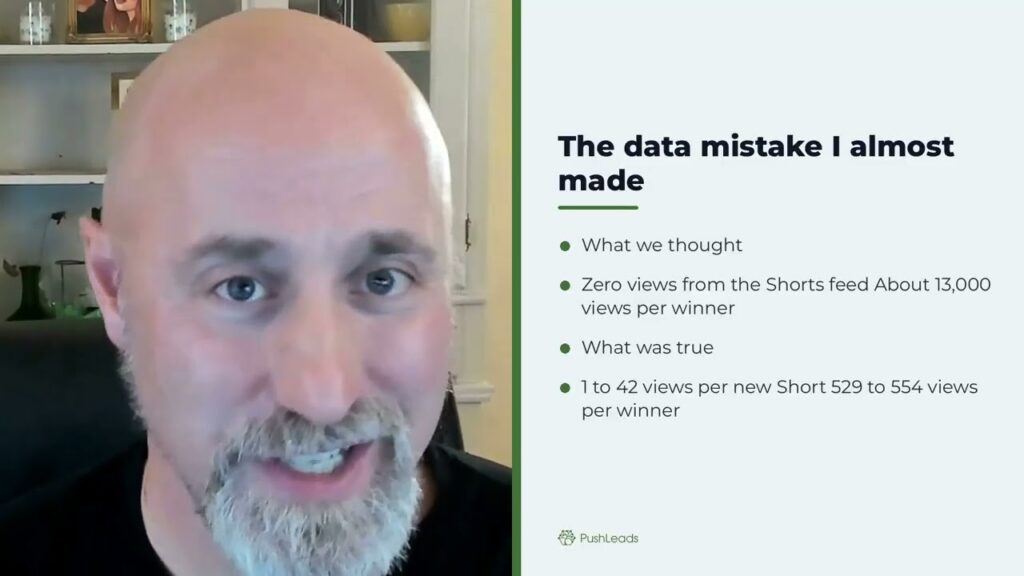
So what happened? So here is the before and after. My September winners were simple, my face full screen and one strong opinion in the first second, right? And these pulled about five hundred and thirty to five hundred and fifty-four views each. And then I noticed around October nineteenth that new Shorts dropped between one and forty-two views, and that was roughly ten to fifteen times drop per Short. Now, I don’t really necessarily care about Shorts, right? But I do care about Google or YouTube suppressing Shorts just ’cause I’m interested in the mechanics of how it works, right? So because a-again, we’re all trying to figure out how to show up in AI search, right? And until we all figure it out, it’s just sort of experimentation, because Google isn’t going to publish, or YouTube isn’t gonna say, "Here’s how to show up in Google’s AI overviews," or, "Here’s how to show up in Google’s AI mode." And so it’s really just me and a whole bunch of other people doing experimentations to figure it out. So anyway, back to the Shorts. What were we posting? So what changed on our end? Well, what changed was volume and the mix. We essentially had built automation that turned blog posts into videos, and a lot of these were faceless slideshow videos with an AI voice of me in some cases. In other cases, they were actually slideshow videos of me where it’s just my voice talking without my talking head. And so we’re making Shorts from these videos, also uploading old videos from Vimeo, and over about seventy-five days, we pushed out around three hundred and seventy-seven uploads. So that was about five videos a day, and most of it came from these templates. Now, it was all unique content. It wasn’t like we were just spamming the web, making good slideshow videos with multiple screens on them and answering the question, adding value. But I’ll own that we did too much, right? Too much, too big. We were like the car that ran off the road. So hey, again, you don’t know the edge of the road until you run off the road. So testing really how far automation could go, and now we know. Five uploads mysteriously disappeared, and here’s the part that tells you who deleted these videos. So it wasn’t really who, it was a what, right? It was YouTube. So what normally happens is if you delete a video yourself, the watch page says, "Removed by uploader." But these five videos just said, "This video is unavailable," right? So that’s what YouTube shows for a video that no longer existed, and that’s YouTube saying, "Hey bro, I deleted the video," right? And if you look at the pattern, five of these fourteen faceless sort of slideshow videos that week vanished, but zero of the other thirty-four vanished, right? So Google or YouTube kept those, and each of those videos has a video with my face on the screen, either myself or an AI avatar. So it wasn’t random. YouTube deleted the templated slideshow videos. Now, the mistake I almost made, quick confession, my first read of the data said that our Shorts were getting zero views from the Shorts feed, and that my winners had done thirteen thousand. Well, both of those are wrong. The analytics table we were pulling was storing a, a rolling twenty-eight day total on every row, so we added the rows together and inflated everything about fifteen times. But hey, that’s what happens. You make mistakes. So before you panic about a drop, always check what the number actually measures. The real drop was big enough and it didn’t need my help. So what YouTube changed? Now, on October first, twenty twenty-six, YouTube posted that the Shorts feed would favor original content and cut reach for channels that mostly re-upload or aggregate. So two details matter here. First, YouTube is judging at the channel level and by what a channel primarily posts. Second, YouTube says that templated-based changes don’t count as making something your own. So that update is aimed at people that are reposting other creations. We weren’t doing that, but a channel posting mostly templated AI-made videos looks a lot like the thing they’re filtering. The bigger match is YouTube’s spam policy. It has a category for automated or synthetic mass production. It says that testing tools and posting a few variations is fine, but flooding the platform with repetitive content is not. And their own example is a channel that’s using the same background music and repetitive AI images, and each video is reading an AI-written script. And that was basically our slideshow lane, and that policy covers pirated and illicit videos as well, so hiding them doesn’t take it out of scope. What YouTube didn’t tell us. Here’s what’s frustrating. YouTube gave us no start date for the update and no recovery timeline, and no screen in Studio tells you that your reach was cut. The one thing they did say through their own creator liaison, Renaine Ritchie, if a channel shifts towards original content, the system will reevaluate its reach. So that’s your whole recovery path right there.
7:01 If a channel shifts towards original content, the system will re-evaluate its reach. – Ren Ritchie, YouTube Creator Liaison
So if you are posting AI content or AI-generated content and not doing original content, you need to start posting more original content. Change what you post and then wait. So what we changed. So here’s what we did starting November second. We turned off the faceless slideshow lane, these produced slideshow videos. We turned off the shorts that were done from there, and we turned off the old re-uploads. And now every AI video has a face on it, my face, an AI version of me, and I’m using Latent Sync to do that because if you try to do AI videos using HeyGen, it’s gonna be fifty bucks a pop because HeyGen is four dollars a minute. So a ten-minute video with HeyGen is gonna cost, I don’t know, fifty to sixty bucks, right? So that’s quite expensive. So I’m using Latent Sync when you see AI versions of my videos. And so YouTube says the label itself doesn’t limit reach. So number three, cap AI uploads to about fourteen a week, anywhere between seven to fourteen a week. And we had been posting about thirty-five videos a week, and a lot of them have been templated. And then four, I’m doing more videos of me, real me. This is real me, this video, recorded for real, bro. And then shorts only when I have a good take. So I’m not doing any templates, no brand bars. And then, so we’ll check every new short at around forty-eight hours, and is the shorts feed showing to anyone at all? That’s the first sign. So the first review is November sixteenth. If nothing moves, we’ll keep holding until mid-December before making any bigger call, making a separate channel. Of course, making a new channel is the last resort, and it’s not the first resort. So I’ll post the results either way. So what this means for contractors, if someone is selling you a faceless YouTube channel or a hundred AI videos a month, ask them three things, whose face is on it, and how different is video forty from video one, and what happens to your, and what happens to your channel if YouTube decides it’s mass-produced? The fix that works is a cheap one. Make videos with your face, your phone, and your actual opinion about your trade. One real video beats fifty templated ones. So here’s the close. The full write-up and the sources and every number is on PushLeads.com, and the link is right in the description of this video. So if your views dropped in October too, and you were publishing AI templated content, tell me in the comments what you were posting. I’m curious if you’re having the same experience I am. And in the end, I don’t actually really super care about shorts, right? Because according to the data, shorts for me doesn’t actually convert people into actually leads. What I really care about is my content showing for AI search, but I also don’t want to run the car off the road, right? By doing that, you’re getting on the radar, and ultimately YouTube could delete or suspend your channel. That’s not what I want. So part of this whole process has been learning and also transparency. So I hope you enjoyed this. I’m Jeremy Ashburn with PushLeads, and I help small businesses get more leads without struggle and frustration. Talk to you soon.
Key Takeaways
Between September and late October, my YouTube Shorts views dropped from around 530 per video to between 1 and 42 views each. That is a 10x to 15x collapse. The cause was posting roughly 377 uploads over 75 days using faceless slideshow automation. YouTube flagged the channel as mass-producing templated content. The recovery path, confirmed by YouTube’s own creator liaison, is shifting back to original content and waiting for the system to reevaluate your reach.
- Posting about 5 videos a day using blog-to-video automation triggered YouTube’s spam and synthetic mass-production policy.
- YouTube silently deleted 5 faceless slideshow videos with no email, no strike, and no Studio notification.
- Zero face-on-camera videos were deleted that same week, only the templated slideshow ones.
- YouTube’s October 2026 update judges reach at the channel level based on what a channel primarily posts.
- Turning off faceless automation, capping AI uploads to 7 to 14 per week, and adding a real face to every video is the documented fix.
- One on-camera video with a genuine opinion outperforms 50 templated AI videos for channel health.
- Recovery requires changing what you post first, then waiting for YouTube to reevaluate. There is no fast-track button.
What Really Caused the YouTube Shorts View Drop
Posting too many faceless, templated AI videos at too high a volume caused YouTube to suppress my Shorts reach at the channel level, cutting views from roughly 530 per video down to between 1 and 42. That is the short answer. The longer version involves a 75-day automation experiment, 377 uploads, and YouTube’s own spam policy language around “automated or synthetic mass production.”
I want to be upfront about something. I run a local SEO and AI visibility agency in Asheville, NC. I should know this stuff. But YouTube is still relatively new territory for me and for most small businesses and contractors. Until late 2025, posting on YouTube felt like a waste of time. You would put up a video, get five or ten views, and wonder why you bothered. That changed when I started seeing YouTube long-form content show up consistently in Google’s AI overviews. That shifted everything for us at PushLeads.
In this video
- 0:00 What This Video Actually Is
- 0:37 Three Automated Pipelines Explained
- 1:33 Architecture Behind the System
- 3:17 Topic Director and Scoring Formula
- 4:03 Script Writing and Format Variants
- 5:15 Stage by Stage Pipeline Walkthrough
- 6:21 Lip Sync Plate and GPU Setup
- 7:25 Spend Breaker and Cost Controls
- 8:18 Eight Quality Gates Before Publishing
- 9:16 Autopilot Publishing and Approval Flow
- 9:53 Real Production Costs Broken Down
- 10:46 Known Weaknesses and Current Limits
- 11:46 Hard Rules Any Rebuild Must Follow
- 12:41 Modules a Product Version Needs
So I started experimenting aggressively. I built automation that turned blog posts into videos, generated AI voiceovers, created slideshow-format Shorts, and re-uploaded older videos from Vimeo. For about 75 days, we were pushing out roughly 5 videos per day. The content was not spam in the traditional sense. We were answering real questions, adding real value. But the volume and format matched exactly what YouTube’s policies describe as mass-produced templated content. And we did not know where the edge of the road was until we drove off of it.
Want more customers from Google & AI search?
Get a free SEO audit of your site — see exactly what to fix first.
The Before and After Numbers You Need to See
In September, my face-forward Shorts were pulling 530 to 554 views each. By October 19th, every new Short I posted landed between 1 and 42 views, a drop of roughly 10 to 15 times per video. Five videos also disappeared from the channel with no explanation.
How do I know if YouTube deleted my videos or if I deleted them myself?
When you delete your own video, the watch page shows “Removed by uploader.” When YouTube removes a video without notifying you, the page just says “This video is unavailable.” That second message is what I saw on all five deleted videos. No email, no community strike, nothing flagged in YouTube Studio. YouTube simply removed them from the platform without telling me.
The pattern made the reason clear. That week I had published 48 videos. Five of the 14 faceless slideshow-format videos disappeared. Zero of the other 34 videos, the ones that had either my real face or an AI avatar of me on screen, were touched. It was not random. YouTube was specifically targeting the templated content that had no visible presenter.
What does a 10x view drop actually look like in YouTube Analytics?
It looks sudden and confusing, especially if you are pulling analytics from a table that stores rolling 28-day totals on every row. I made that mistake. My first read of the data suggested my winning Shorts had pulled 13,000 views and that new Shorts had zero views from the Shorts feed. Both numbers were wrong because I was summing rows that each held 28-day totals, inflating everything by about 15 times. The actual drop was still significant. It just did not need my help making it look worse. Before you panic over any analytics drop, verify exactly what time period each row in your data is measuring.
Why did the drop happen in October specifically?
YouTube published an update on October 1, 2026, stating the Shorts feed would favor original content and reduce reach for channels that primarily re-upload or aggregate content. Two things matter in that language. First, YouTube evaluates at the channel level, not just the individual video. If your channel mostly posts templated content, the whole channel takes the hit. Second, YouTube explicitly says that template-based modifications do not count as making content your own. Even if every video technically answers a unique question, a channel full of same-format slideshows with AI voiceovers looks to YouTube’s system like the thing they are filtering against.
What YouTube’s Spam Policy Actually Says About AI Videos
YouTube’s spam policy includes a specific category for automated or synthetic mass production, and it describes a channel using the same background music, repetitive AI images, and an AI-written script read in each video as a clear violation. That description matched our slideshow automation lane almost exactly.
Is testing AI video tools against YouTube’s rules?
Testing AI tools and posting a few variations is explicitly allowed under YouTube’s policy. What is not allowed is flooding the platform with repetitive content that follows the same template at scale. We were not testing a few variations. We were running production-level automation that generated multiple videos per day, week after week. There is a meaningful difference between running an experiment and running an assembly line, and YouTube’s system picked up on that distinction.
Does YouTube’s spam policy apply even if you are not reposting other people’s content?
Yes. The policy covers original content that is still produced at automated, repetitive scale. The fact that we were writing our own scripts and creating our own slides did not protect us. YouTube’s policy language about synthetic mass production does not require that the content be stolen. It only requires that it be repetitive and automated in a way that floods the platform. We were creating genuinely useful content for local service businesses, but the format and volume still triggered the policy.
How does YouTube decide which videos to delete versus which ones to suppress?
Based on what happened to our channel, YouTube appears to use format as one signal alongside volume. Every video that had a face on screen, whether my real face or an AI avatar, survived. Every video that was a pure slideshow with no on-screen presenter was at risk. Five of those were deleted outright, while the broader channel saw its Shorts reach suppressed. YouTube has not published an exact algorithm for this, but the pattern in our data was consistent enough to draw a clear conclusion about format mattering.

The Recovery Plan We Executed Starting November 2nd

Stopping the faceless slideshow automation, adding a face to every AI-generated video, capping uploads to 7 to 14 per week, and increasing the number of real on-camera videos is the documented path back. This is not a theory. It comes directly from YouTube creator liaison Ren Ritchie, who stated publicly that if a channel shifts toward original content, the system will reevaluate its reach.
What specific changes did we make to the content format?
We turned off three things completely: the faceless slideshow production lane, the Shorts made from those slideshows, and the re-uploads of old Vimeo content. For AI-generated video that continues, every video now has a face on screen. I am using Latent Sync for this rather than HeyGen because HeyGen charges around four dollars per minute, which puts a 10-minute video at roughly 50 to 60 dollars per video. Latent Sync lets me add an AI version of my face to a video at a much lower cost. YouTube has confirmed that the AI-generated content label itself does not limit reach, so having a disclosed AI avatar is acceptable as long as it is not flagged for other policy violations.
How many videos per week is safe to post on YouTube?
We capped our uploads at 7 to 14 AI-assisted videos per week, down from the 35 or so we had been posting at peak automation. The right number for your channel likely depends on your niche, your content format, and how long your channel has been active. What we know is that 35 mostly templated uploads per week triggered suppression on our channel. Seven to 14 with mixed formats and real on-camera content appears to be the safer range based on our testing so far.
How long does YouTube’s recovery process take?
YouTube has not published a specific recovery timeline, and nothing in YouTube Studio indicates your reach was suppressed or when it might recover. Our first checkpoint is 48 hours after each new Short to see whether the Shorts feed is distributing it at all. We set November 16th as our first formal review date after making the November 2nd changes. If nothing has moved by mid-December, the next option is evaluating whether a separate channel makes sense. That is the last resort, not the first move.

Why AI-Generated Content Without a Face Triggers YouTube’s Filter
YouTube’s automated systems appear to use the presence of a consistent on-screen presenter as a signal of originality and channel authenticity. Channels that post at high volume with no presenter face, only text slides, background music, and AI voice, look identical to the spam accounts YouTube is actively removing.
Why does having your face on camera matter more than the content itself?
Your face creates a signal that a human is behind the content and that it comes from a specific person with a specific perspective. Templated slideshows, even with great information, can be generated by any account at any volume. YouTube’s system cannot easily distinguish between a knowledgeable local plumber posting educational content and a spam account posting 50 market-report videos per day if neither one has a face on camera. Adding your face is the fastest way to separate yourself from the mass-production pattern YouTube is trying to filter out.
Can I use an AI avatar instead of my real face and still recover reach?
Based on our experience, yes, as long as the AI avatar is a consistent representation of a real person associated with the channel and you are following YouTube’s disclosure requirements. I use Latent Sync to generate an AI version of my face for certain videos, and those videos were not flagged or deleted during the same period when our faceless slideshows were removed. YouTube’s own guidelines state that the AI-generated content label does not itself limit reach. The key is having a face, real or AI-generated, that connects the video to an actual person.

What This Means If You Are a Contractor Paying for YouTube Services
If someone is selling you a faceless YouTube channel or a package of 100 AI videos per month, you need to ask three specific questions before you spend a dollar. Whose face is on the videos, how different is video 40 from video 1 in terms of format and structure, and what happens to your channel if YouTube decides the content is mass-produced. Those three questions will tell you more than any sales pitch.
What is the cheapest way for a contractor to fix a suppressed YouTube channel?
Record a video with your phone, your face on camera, and one genuine opinion about your trade. That is the fix. You do not need a studio, a professional editor, or an AI tool. One real video recorded in your truck, at a job site, or in your shop costs nothing and signals exactly what YouTube is looking for: a real person with real knowledge sharing original content. One on-camera video of that kind will outperform 50 templated slideshows for channel health, based on what we saw in our own data.
How does YouTube channel suppression affect lead generation for local contractors?
Direct view counts on Shorts do not convert to leads in any meaningful way for a local service business. I am honest about that. What matters is whether your YouTube content is being indexed and surfaced in Google search and AI overviews, and that requires your channel to maintain a healthy standing with YouTube. A suppressed or penalized channel does not get cited in AI answers. For contractors who want their YouTube strategy for lead generation to actually work, keeping the channel in good standing is not optional. It is the foundation everything else sits on.
Why does YouTube channel health matter for AI search visibility?
Google’s AI overviews and AI mode pull from indexed sources they consider authoritative and trustworthy. A YouTube channel that has been suppressed or is associated with mass-produced content is a weaker source signal than a channel that consistently publishes original, face-forward content on a specific topic. Understanding why AI cites YouTube content at all comes down to originality and topical consistency, and those are exactly the two things that faceless automation tends to undermine over time.
The Analytics Mistake That Almost Made Everything Worse
Misreading your own analytics during a view drop is easy to do, and it can send you in completely the wrong direction. I nearly reported that my Shorts were pulling zero views from the Shorts feed and that my winners had earned 13,000 views total. Both were wrong by a factor of about 15.
What was the actual data error we made?
The analytics table I was pulling data from stored a rolling 28-day total on every individual row. When I summed the rows to get a total, I was adding 28-day windows on top of each other and inflating the final number by roughly 15 times. So 530 actual views became a reported 7,950, and a Shorts feed that was sending a small number of views appeared to be sending zero. The real drop was still significant and did not need help looking worse. But the error would have caused me to make decisions based on completely fabricated numbers.
How should you audit a view drop before making any changes?
Before changing anything about your content or format, go back to raw video-level data for each individual Short and look at the views column for a specific fixed date range, not a rolling window. Compare the same time period for September videos versus October videos at the individual video level. Only after you have confirmed the drop is real in the raw data should you start investigating format, volume, or policy issues as causes. Making channel-level decisions on bad analytics is worse than making no decision at all.
YouTube’s October 2026 Update and What It Does Not Tell You
YouTube’s October 1, 2026 Shorts update confirmed that original content gets priority in the feed and that channels primarily re-uploading or aggregating content will see their reach cut. What YouTube did not say is when the update took effect, how long recovery takes, or how to tell in Studio that your reach has been cut.
Why does YouTube not notify you when your reach is suppressed?
YouTube’s suppression of reach is different from a community strike or a policy violation warning. It is an algorithmic adjustment to how widely your content is distributed, not a formal penalty against your account. Because it is handled algorithmically rather than through a manual review process, there is no notification system built around it. This is frustrating for creators because you can be significantly suppressed and have no way of knowing from Studio whether the cause is a policy match, a format issue, or simple underperformance.
What did YouTube’s creator liaison actually say about recovery?
Ren Ritchie, YouTube’s creator liaison, stated that if a channel shifts toward original content, the system will reevaluate its reach. That is the entire documented recovery path. There is no appeal process, no support ticket you can file, and no checkbox to tell YouTube you have made the change. You change the content, you post more original work, and you wait. The system is supposed to detect the shift and adjust reach accordingly, but YouTube has not provided a specific timeline for how long that process takes.
How YouTube Fits Into the Bigger AI Search Picture
Shorts views and subscriber counts are not the reason we invest in YouTube. The reason is that YouTube content, particularly long-form video, shows up in Google’s AI overviews and AI mode answers at a rate that makes it one of the most valuable content formats for local businesses right now.
We have published data on how YouTube videos in Google search appear both as traditional video results and as cited sources inside AI-generated answers. That dual presence is what makes YouTube worth the effort for a plumber in Asheville or a roofer in Charlotte. If your channel gets suppressed because of automation choices, you lose both the direct search traffic and the AI citation potential at the same time.
Looking at AI visibility for local businesses across our client base, YouTube is consistently the most cited content format in AI answers about local services. That is not an accident. YouTube videos are indexed, they carry topical authority signals, and they are associated with a named person or business in a way that anonymous blog posts often are not. Understanding YouTube volume versus citation quality helps clarify why 10 strong on-camera videos will serve your business better than 100 templated slideshows, even if the templated videos never get suppressed.
We have also published data on YouTube as top AI citation source across 45 businesses, and the pattern is consistent: original, face-forward content on a specific trade or service topic earns citations. Mass-produced content that looks interchangeable with other channels does not. That is the same logic YouTube applies to reach. Originality is the signal both platforms are rewarding.
Frequently Asked Questions
How many videos per day can I post on YouTube before getting suppressed?
There is no published hard limit from YouTube, but our experience suggests that 5 or more videos per day, particularly when most are templated or faceless, is enough to trigger suppression. We posted approximately 377 videos over 75 days, averaging about 5 per day, and the channel was suppressed. A safer range appears to be 1 to 2 per day, with format variety and on-camera content mixed in regularly.
Will YouTube restore my deleted videos if I contact support?
In our case, YouTube did not send a notification or offer an appeal path for the 5 deleted videos. Videos removed by YouTube for spam or mass-production policy reasons are generally not restored through a support request. The documented path forward is to change what you post going forward, not to try to recover what was removed. Focus on creating original content and let the system reevaluate from your new posting behavior.
Does using an AI voice on YouTube videos get your channel penalized?
Using an AI voice alone does not appear to cause suppression. The issue in our case was the combination of AI voice, slideshow format with no presenter face, and high upload volume that matched YouTube’s description of automated synthetic mass production. AI voice on a video that also has an on-camera presenter, strong original scripting, and reasonable upload frequency appears to be acceptable under current YouTube policy.
How do I know if my YouTube channel is currently suppressed?
YouTube does not display a suppression notice in Studio. The clearest signal is a sudden and consistent drop in views across all new uploads, combined with low or zero impressions from the Shorts feed specifically. Check individual video analytics at the 48-hour mark after posting. If the Shorts feed column shows no impressions on multiple consecutive uploads, that is a strong indicator of suppression rather than simply poor content performance.
Should I start a new YouTube channel if my current one is suppressed?
Starting a new channel is the last resort, not the first response. YouTube’s creator liaison has confirmed that channels can recover by shifting to original content. A new channel starts with zero authority, zero history, and zero indexed content. The correct sequence is to change your content format, reduce volume, add on-camera presence, and then wait at least 6 to 8 weeks before concluding the channel cannot recover. Only if there is no movement after that period should a new channel be seriously considered.
Do YouTube Shorts actually generate leads for local service businesses?
Based on our internal data, Shorts alone do not reliably convert into leads for local contractors. The more important value of a healthy YouTube presence is the channel’s ability to get content indexed in Google search results and cited in AI-generated answers. Long-form videos on specific service topics drive that outcome far more than Shorts. Shorts can support channel growth and brand awareness, but they should not be the primary format if lead generation is the goal.
What is Latent Sync and why did you choose it over HeyGen for AI avatar videos?
Latent Sync is an AI lip-sync and avatar tool that lets you add a face to a video at a significantly lower cost than HeyGen. HeyGen charges approximately four dollars per minute of generated video. A 10-minute video through HeyGen costs roughly 50 to 60 dollars. For a small business or agency producing multiple AI-assisted videos per week, that cost adds up fast. Latent Sync provides a comparable output for adding a presenter face to AI-generated videos at a much lower per-video cost.
Is disclosing AI-generated content required on YouTube?
Yes. YouTube requires creators to disclose when content is AI-generated, particularly for realistic-looking synthetic media. YouTube provides a disclosure checkbox in the upload settings. Failing to disclose can result in YouTube adding its own label to your video or taking action on the content. Importantly, YouTube has stated that the AI-generated content label itself does not reduce a video’s reach. Disclosure is required but it is not a penalty.
Start Fixing Your YouTube Channel Before the Next Algorithm Shift
If your Shorts views dropped sharply in October and you were running any kind of templated or faceless video automation, the cause is almost certainly the same thing we ran into. The fix is not complicated. Record videos with your face. Use your phone. Share a genuine opinion about your work. Post fewer videos with more original content in each one. Cap your AI-assisted uploads to a reasonable weekly number and make sure every AI video has a face attached to it.
The channels that survive algorithm shifts on YouTube are the ones that could survive the removal of every automated shortcut. If your channel looks the same as 500 other channels posting the same format at the same volume, YouTube’s system will eventually treat it that way.
At PushLeads, we work with local service businesses and contractors in Asheville and beyond to build YouTube and AI search visibility that holds up over time, not just until the next policy update. If your channel has taken a hit, or if you want to build a YouTube presence correctly from the start, reach out to us at pushleads.com/contact and let us take a look at what you are working with.
Related reading from PushLeads
- Do YouTube Videos Show Up in Google Search? Yes, and in AI Answers Too
- Why Contractors Should Use YouTube for Leads in Google and AI Search
- Is AI Recommending Your Business? The 2026 Data on AI Search and Local Leads
- Why AI Keeps Citing YouTube (6,102 Times Across My 39 Clients)
- AI Citation Data From 45 Businesses: YouTube Is the Most-Cited Source in AI Answers
- How Many YouTube Videos Drive AI Citations? What 100 Million Citations Actually Show
Keep Reading
Want more customers from Google & AI search?
Get a free SEO audit of your site — see exactly what to fix first.
Your path · What Is SEO? The Complete Guide to Search Engine Optimization for Businesses
Keep going: read these next

- Up nextSEO Analytics and Reporting Research Report: Measuring Success That Actually Drives Business Results
- AI-SEO: How Artificial Intelligence is Revolutionizing Search Rankings in 2026
- Visual and Video SEO: The definitive guide to optimizing for image and video search in 2026




Want this done for you?
Scan your site. See the gaps. Decide with numbers.
- Rankings, Google Business Profile and site-speed teardown
- Report lands in your inbox in about a minute
- No obligation · 4.9 from 67 Google reviews
 Continue reading