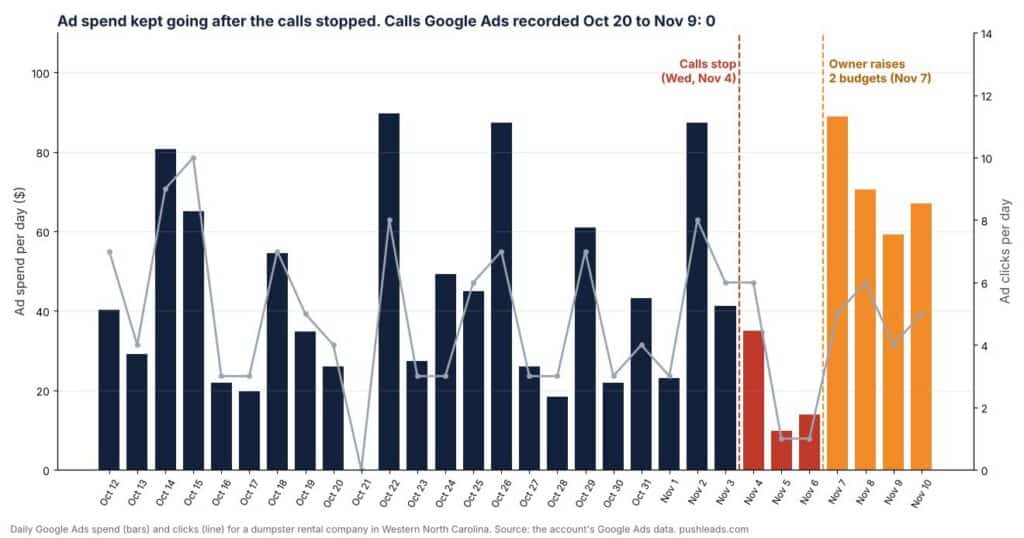
Short answer: when your calls stop but your ad bill goes up, don’t start by changing the ads. Start by calling yourself, then check who changed what, then check whether your calls are being counted at all. One of our clients, a dumpster rental company in Western North Carolina, saw calls drop off a cliff on a Wednesday. Over the next three days the ad spend went up. Google Ads had recorded zero calls in the three weeks before that, so nobody could see what was going on.
Here’s how we diagnosed it, what we found, and the checklist you can run on your own business this week.
TL;DR
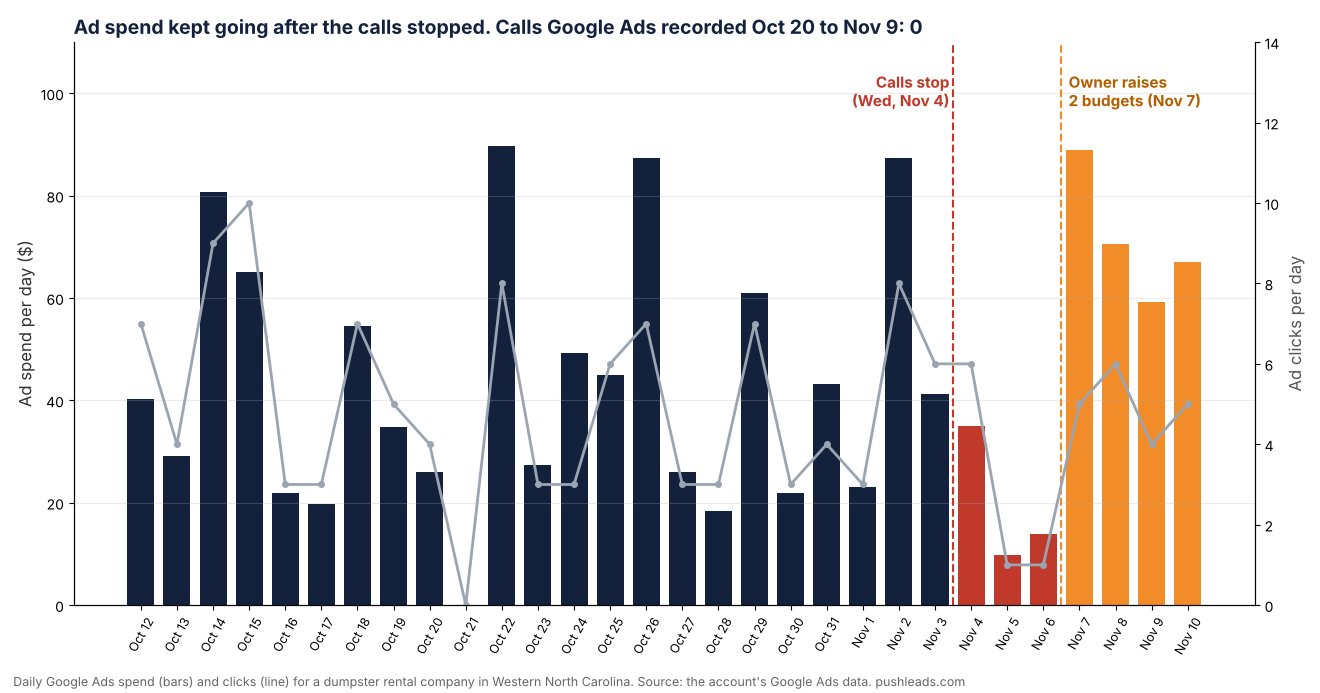
- Calls stopped on Wednesday, November 4. The owner raised two campaign budgets on November 7, so weekly ad spend went from $281 to $347.
- From October 20 to November 9 the account spent $924.67 on 91 ad clicks. Google Ads recorded zero calls in that time, because nothing on the website was set up to count them.
- We never found one thing that broke on that Wednesday. We found several things quietly leaking calls: wrong phone numbers on five pages, a tap-to-call link in the header that opened an error page on every page of the site, and 80 dead pages Google was still sending people to.
- Most of it was fixable in a day. The hard part was finding it, because nothing was being measured.
- The order matters: call yourself, read the change history, check clicks (not just spend), check tracking, tap every phone link, then look at search.
What happened: the numbers
The owner told us his phone went quiet in the middle of the week. Nothing looked different in the ads, and the bill was going up, not down.
Here’s what the account data showed:
- The spend increase was a budget change. Two campaign budgets were raised on November 7, one from $25 to $40 a day and one from $10 to $20 a day. The owner made the change himself after the calls dried up. That’s a normal reaction, and it’s exactly why you check the change history first.
- Clicks dipped right after the drop. On November 5 and 6 the ads got one click a day, down from a typical 3 to 8. Then clicks came back once the budgets went up. The calls didn’t.
- Zero calls recorded. From October 20 to November 9, Google Ads recorded no calls at all. The account had no Google Ads tag on the website and no call tracking, so a call from an ad visitor looked exactly like no call.
- Search was sliding too. In Search Console, the site’s impressions were down 29% compared with the 30 days before, and clicks were down 20%.
Want more customers from Google & AI search?
Get a free SEO audit of your site — see exactly what to fix first.
Why “calls stopped, spend went up” is so hard to diagnose
Ad spend is the one number you always see, because it’s on your bill. Calls are the number you often can’t see. If your ads, website and Google Business Profile all send people to the same phone, and nothing counts where each call came from, you’re left guessing.
That’s when people make the expensive move: raise the budget, switch agencies, or cut the ads entirely, without knowing whether the ads were ever the problem. In this case the ads were getting clicks. What happened after the click was the problem.
What we found
- The contact page called the wrong business. On phones, the “Call” and “Text” buttons on the contact page pointed to an out-of-state number. It had been that way since at least mid-2025. Desktop visitors saw the right number, so it was easy to miss.
- The homepage link dialed a stranger. The number shown on the homepage was right, but the link behind it dialed a different number the owner didn’t recognize.
- Three more pages had made-up numbers. One was literally 123-456-7890. These were on pages our own content system wrote last year. That one’s on us.
- The header tap-to-call link was broken on every page. It was missing one character, so tapping the phone number in the header opened an error page instead of the dialer.
- 80 dead pages. An old redirect plugin had quietly stopped working in August, and its redirects were never moved over. Google kept sending searchers to pages that no longer existed. Separately, the site’s best pricing post, with about 15,000 search impressions in 90 days, had been switched to a draft, so it disappeared too.
- The main search was split between pages. The homepage ranked around 4th for the main “dumpster rental” search in the city, while a second page aimed at the same search got almost nothing. The map listings and ads above the regular results took most of the clicks anyway.
One more thing: another marketing company had told the owner his backlinks pointed to the wrong pages. We checked all 16 pages other sites link to. Every one of them loaded fine. Scary claims are worth checking before you act on them.
What we did about it
- Fixed every phone link. All wrong numbers now point to the real one, and we checked every page on the site the way a phone sees it, not just the ones we edited.
- Fixed the header link and tested it by tapping it on a phone.
- Added the Google Ads tag and a phone conversion. Taps on the phone number now get counted in Google Ads, and form leads get counted in Google Analytics. Google has a guide to tracking calls to the number on your website if you want to set this up yourself.
- Sent the 80 dead pages to the right live pages with permanent redirects, including the pricing post. Here’s why redirect cleanup recovers rankings.
- Made one page the clear winner for the main search, and merged the duplicates into it.
- Paused the ads for a few days while the fixes settled, so the account wasn’t paying for clicks it couldn’t measure.
We also found a lesson for ourselves. We had fixed the contact page number back in early October. The same day, an older copy of the page got saved over our fix, and the wrong number came back. Nobody re-checked it for a month. Now every phone fix gets checked again 24 hours later.
How to diagnose it yourself: the checklist
Do these in order. The early steps are free and take minutes.
- Call yourself. From a cell phone, call the number in your ad, on your Google Business Profile, and on your website. Then do it again by tapping the number on your site from a phone, not a computer.
- Read your Google Ads change history for the week before the drop. It shows who changed what and when, including budgets. Google explains it in About change history.
- Look at clicks, not just spend. If clicks held steady and calls didn’t, the problem is probably after the click: the page, the phone link, or the phone itself.
- Ask “are calls counted at all?” If Google Ads shows zero calls for weeks, that usually means nothing is counting them, not that nobody called. Set up call, form and chat tracking before you change anything else.
- Tap every phone link on your site. Header, footer, contact page, homepage buttons, and any page written by a tool or an AI writer. Here are the click-to-call mistakes most contractor sites make.
- Check Search Console for missing pages. Look for pages that suddenly return errors or went to draft, especially ones that used to get a lot of impressions.
- Check what’s above you in search. If the map pack and ads sit on top, a decent ranking can still bring almost no clicks.
- Re-check your fixes the next day. Saves get overwritten. Caches serve old versions. A fix isn’t done until it’s still there tomorrow.
If your calls are being counted but the numbers look too good, the opposite problem can happen too. We wrote about how robocalls inflate your lead count. And if you add tracking numbers, here’s how to do it without wrecking your NAP.
FAQ
Why did my calls stop even though I’m spending more on Google Ads?
Usually because something between the click and the phone broke, or because calls were never being counted in the first place. Check your phone links, your landing pages and your change history before you touch the budget.
Should I raise my budget when calls drop?
Not until you know why they dropped. If clicks are steady and calls aren’t, more budget just buys more clicks that don’t turn into calls.
Why does Google Ads show zero calls when I know people called?
Google Ads only counts calls you’ve set it up to count. Calls from your ad’s call button, calls to a number on your website, and taps on your phone number are each tracked separately. If none are set up, the report shows zero.
How do I know if my website phone number works?
Tap it on a phone, on every page that shows it. A number can look right on the screen and still dial something else, because the link behind it is a separate setting.
Want us to check yours?
If your calls dropped and you can’t tell why, get a free audit. We’ll check your phone links, your tracking and your ad account, and tell you what we find.
Keep Reading
Want more customers from Google & AI search?
Get a free SEO audit of your site — see exactly what to fix first.
Your path · What Is SEO? The Complete Guide to Search Engine Optimization for Businesses
Keep going: read these next
 You’re hereCalls Stopped but Ad Spend Went Up? How to Diagnose It
- Up nextSEO Analytics and Reporting Research Report: Measuring Success That Actually Drives Business Results
- AI-SEO: How Artificial Intelligence is Revolutionizing Search Rankings in 2026
- Visual and Video SEO: The definitive guide to optimizing for image and video search in 2026



Want this done for you?
Scan your site. See the gaps. Decide with numbers.
- Rankings, Google Business Profile and site-speed teardown
- Report lands in your inbox in about a minute
- No obligation · 4.9 from 67 Google reviews
 Continue reading